Old Gus' Daggerheart System Reference Document
version 3.0i (2026-09-14)
Introduction
Welcome Reader—
Old Gus' Daggerheart System Reference Document (OG-DHSRD) is a hypertext version of the Daggerheart System Reference Document 2.0 (revised August 25, 2026), © Critical Role, LLC, under the terms of the Darrington Press Community Gaming (DPCGL) License. There are no previous modifications by others.


This document has been edited and condensed. You can use this edition to quickly look up Daggerheart rules online, share them with others, or copy text into a character sheet that works for you. Don't mistake anything you read here for the "rules as written".
The OG-DHSRD is not a replacement for the Daggerheart Core Rulebook, which contains setting information, additional examples of gameplay, and lots of great advice for playing Daggerheart—not to mention gorgeous artwork and the seductive odor of cardboard and book glue.
Thanks to Darrington Press for this amazing resource, and thank you for reading—and may this record bring you and yours many happy adventures!
—Old Gus
Editor's Notes — If you'd like to support this work, buy Old Gus a ☕ Ko-fi!
Editorial Mission
- Incorporate Daggerheart Content
- Condense the Daggerheart SRD into fewer, more complete topics, and incorporate updates to the Daggerheart SRD and Daggerheart Errata. Provide page and card number references for the Daggerheart Core Rulebook (DH Core) and Daggerheart: Hope & Fear Expansion (DH HF).
- Use Plain Language
- Edit explanations, instructions, definitions, and procedures in plain language so they are complete, clear, consistent, and concise. Correct suspected misprints. Preserve the text of character options, domain cards, and adversaries.
- Address Players First
- Organize information for those who haven't played a tabletop role-playing game (TTRPG) before, and write to the player. "You" is you, the player—or your Player Character (PC). "The GM" is the Game Master (GM).
- Improve Accessibility and Inclusion
- Avoid referencing character sheets or physical cards the reader might not own or be able to use. Add metric unit conversions and a dyslexic reader mode. Provide a mobile-friendly format, extensive hyperlinks, tooltips, and quick-references.
- Add Tools
- Human-Made, Human-Forward
- No ads. No accounts. No data collection. No algorithms. No machine learning. No large-language models. No vibe coding. This is a living document—revisions are an ongoing project.
Translations
While the editor can't verify their accuracy, translations of the OG-DHSRD are available:
What is Daggerheart?
- DH Core 4
- DH Core 8
Daggerheart is a tabletop roleplaying game for one Game Master (GM) and 2–5 players, each in control of one Player Character (PC). The game can be played in a single session (a "one-shot"), or a multiple sessions (a "campaign"). A game session usually takes 2–4 hours. Combat is an important part of the game.
How to Play Daggerheart
- The GM describes the situation, narrates events, and controls NPCs, adversaries, and obstacles the PCs encounter.
- You roleplay your PC's reaction to the scenario, declaring their action and dialogue.
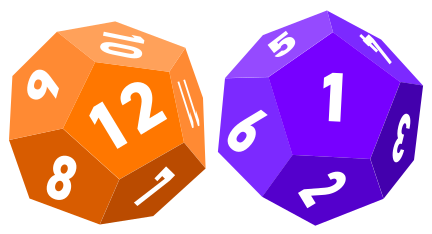
- If your action depends on fate or fortune, the GM calls for an action roll. To make an action roll, you roll your Duality Dice—two distinct twelve-sided dice (d12s)—representing Hope and Fear. The dice are rolled, summed, and relevant bonuses called modifiers are added to the result.
- The total is compared to a Difficulty set by the GM. If the total meets or beats the Difficulty, you succeed. If it's lower, you fail.
- The situation also changes based on which Duality Die rolls higher, giving the player helpful Hope, or giving adversary Fear to the GM.
Video Overview
- Editorial Addition
This video covers the flow of the game, and several key terms, including:
Player Principles and Best Practices
- DH Core 9
Players should keep the following principles and practices in mind:
Principles
- Be a fan of your character and their journey.
- Spotlight your friends.
- Address the characters and address the players.
- Build the world together.
- Play to find out what happens.
- Hold on gently.
Best Practices
- Embrace danger.
- Use your resources.
- Tell the story.
- Discover your character.
Getting Ready to Play
- Editorial Addition
- Character Creation
- Go through the character creation process and record your statistics on a character sheet.
- Cards
- The official playset includes physical cards and paper sheets to facilitate play, but you don't need them. Instead, you can copy text from this document, and record it alongside your character sheet.
- Polyhedral Dice
- A polyhedral die is noted by the number of sides it has—for example, a d6 is a six-sided die. Multiple dice are called for, too—for example, 2d10 is two ten-sided dice. Each player will need at least 2d12 for Duality Dice, and at least one d20, d10, d8, d6, and d4 each. At higher levels—or if you're the GM—you'll need several dice of each size. You can share dice with others. If you can't use dice, any method of generating random numbers works.

- Notes
- Have a way to take a few notes about your fellow PCs, the story, and other characters you meet.
- Tokens and Counters
- A few distinct tokens to represent Hope, Fear, Countdowns, or other things you need to keep track of can be useful—coins, poker chips, spare dice, small rocks, loose snacks—anything. For the GM, an abacus can be a handy tool for keeping track of several things at once.
Character Creation
Ancestries
Communities
Classes and Subclasses
Domains
Domain Cards
Equipment
Traits
Hope
- DH Core 90
You start with 2 Hope at character creation and gain one more when you roll with Hope. You have a maximum of 6 Hope slots. Hope carries over between sessions.
Spending Hope
- Help an Ally (1 Hope)
- You help a PC with an action roll. Describe how you help, roll your own advantage die, and apply the result as a modifier to their roll. If the PC you help gains advantage from multiple sources, they add only the highest result from any rolled advantage dice.
- Utilize an Experience (1+ Hope)
- When you Utilize an Experience on a relevant roll, add its modifier to the result. You can spend additional Hope to utilize additional relevant Experiences.
- Tag Team Roll (3 Hope)
- Initiate a Tag Team Roll.
- Class Hope Feature (3 Hope)
- Each class provides a class Hope feature.
- Other Uses for Hope (1+ Hope)
- Other uses for Hope are defined by class or subclass features, domain cards, and equipment.
- Rolling with Hope
- If you roll with Hope for an action prompted by a Hope Feature or domain card, you can spend the Hope you gain from the roll on the action.
Experiences
- DH Core 20
- DH Core 93
An Experience is a word or phrase that evokes a personality traits or aptitudes you've acquired. Experiences can relate to your backstory, characteristics, specialties, or skills.
- Creating Experiences
- You start with two Experiences from character creation. You create new Experiences each time you reach a new tier. Experiences start with a +2 modifier.
- Utilize an Experience
- When you make an action roll or reaction roll, you can spend a Hope to add a relevant experience's modifier to the result. Describe how the Experience applies. The GM might require you further justify the Experience's relevance, but you decide whether the Experience applies (within reason). You can apply more than one Experience to a roll.
- Increasing Experience Modifiers
- When you gain a level, you can purchase an advancement to increase an Experience's modifier.
Editor's Notes — This section is based off a post by OneBoxyLlama:
Gaining Levels
- DH Core 109
- DH Core 110
- DH Core 111
The PCs gain a level when the GM decides you've reached a narrative milestone (usually about every 3 sessions).
Each time you gain a level, go through the following four steps:
- Step 1: Check for Tier Achievements
- There are 10 PC levels, which are divided into 4 tiers. When gaining a level causes you reach a new tier—at Level 2, Level 5, and Level 8—you gain new tier achievements.
- Step 2: Purchase Advancements
- You gain two advancements, which you use to purchase benefits available to your tier or lower. Additional advancements become available at Tier 3 and Tier 4.
- Step 3: Increase Damage Thresholds
- Increase the bonus to your Major and Severe damage thresholds by 1.
- Step 4: Choose A Domain Card
- Choose a domain card and add it to your loadout or vault. If your loadout is full, you can immediately place a card into your vault to make room. Additionally, you can exchange one of your domain cards for another of equal or lower level.
Tier Achievements
- DH Core 109
Your tier affects your tier achievements, and access to advancements.
| Level | Tier | Tier Achievements |
|---|---|---|
| Level 1 | Tier 1 | — |
| Level 2–4 | Tier 2 |
|
| Level 5–7 | Tier 3 |
|
| Level 8–10 | Tier 4 |
|
Advancements
- DH Core 110
You can purchase an advancement a number of times equal to its slots. The Proficiency and Multiclassing options require spending both advancements to purchase.
| Advancement | Benefits | Tier 2 | Tier 3 | Tier 4 |
|---|---|---|---|---|
| Traits | Gain a +1 bonus to two trait modifiers and mark them. You can't use this advancement to increase a marked trait until you reach a new tier and clear it. | 3 | 3 | 3 |
| Hit Point | Gain a Hit Point slot. | 2 | 2 | 2 |
| Stress | Gain a Stress slot. | 2 | 2 | 2 |
| Experiences | Gain a +1 bonus to two Experiences. | 1 | 1 | 1 |
| Domain Card | Choose a new domain card from your domains. The card's level can't exceed the level range of the tier slot used to purchase this advancement. | 1 | 1 | 1 |
| Evasion | Gain a +1 bonus to your Evasion. | 1 | 1 | 1 |
| Enhanced Subclass | Progress a subclass, gaining its specialization feature—or if you have them already, its mastery features. Choosing this option excludes the Multiclass advancement for this tier. | — | 1 | 1 |
| Proficiency | Gain a +1 bonus to your Proficiency. You must spend both advancements to purchase this benefit. | — | 1 | 1 |
| Multiclassing | You gain additional class, as described under multiclassing. You must spend both advancements to purchase this benefit. Choosing this option excludes the Enhanced Subclass advancement for this tier. You can only choose this advancement once. | — | 1 | 1 |
Transformations
Rules of the Game
Key Terms
- Editorial Addition
† — Indicates an Optional Rule.
A
- action
- action roll
- advancement
- advantage
- adversary
- Aetheris
- Age of Umbra
- Agility
- ancestry
- Arcana
- area of effect
- armor
- Armor Slot
- Armor Score
- Assassin
- attack
- attack roll
- Avoid Death
B
- Bard
- Base Score
- base threshold
- Battle Points
- Beast Feast
- Beastbound
- Beastform options
- Blade
- Blaze of Glory
- Bone
- Brawler
- burden
C
- Call of the Brave
- Call of the Slayer
- campaign frame
- Castle High
- character sheet
- Clank
- class
- Codex
- collision damage†
- colossus†
- Colossus of the Drylands
- community
- condition
- conflict between PCs (PVP)†
- consumable
- Core Gameplay Loop
- Countdown
- curse†
- cover
- creature
- critical damage
- critical success (crit)
D
- damage threshold
- damage
- damage dice
- damage roll
- damage type
- Dark Heart of Andaluria
- death move
- Demigod
- Difficulty
- direct damage
- disadvantage
- Divine Wielder
- domain
- domain card
- Doom Track†
- downtime
- downtime move
- Drakona
- Dread
- Druid
- Duality Dice
- Duneborne
- Dwarf
E
- Earthkin
- Elemental Origin
- Elf
- Emberkin
- Encounters
- environment
- Evasion
- Experience
- equipment
- Evolution
- Executioners Guild
F
- faction†
- Faerie
- falling damage†
- fate roll†
- Faun
- Favor
- Fear
- Fear Die
- Feast†
- Five Banners Burning
- Flight Artfacts
- Flow of the Game
- Finesse
- Firbolg
- Focus
- Foundation Feature
- Freeborne
- Frostborne
- Fungril
G
- Galapa
- Game Master (GM)
- Ghost
- Giant
- Goblin
- GM move
- GM turn
- GM's die
- Gnome
- gold
- gold coin†
- golden opportunity
- Grace
- Group Action Roll
- Guardian
H
- Halfling
- Hearthborne
- Hedge
- Help an Ally
- Hex Crawl†
- Hidden
- Highborne
- Hit Point
- Hope
- Hope Die
- HP
- Human
- humanoid
- Hunt†
I
J
K
L
M
- magic damage (mag)
- Mastery Feature
- Major damage
- Martial Artist
- Massive damage†
- Midnight
- Moon
- Minor damage
- Mixed Ancestry
- modifier
- Motherboard
- move
- movement
- multiclassing
N
O
P
- Pact of the Endless
- Pact of the Wrathful
- Phased battles
- physical damage (phy)
- Player Character (PC)
- Poisoners Guild
- Pool
- Presence
- Primal Origin
- Proficiency
R
- range
- range, defined†
- Ranger
- Ranger companion
- Reaction
- Reanimated
- reaction roll
- Reborne
- Reign of the Weredragon
- Recall Cost
- reroll
- resistance
- rest
- Restrained
- Ribbet
- Ridgeborne
- Risk It All
- Rogue
- rounding
S
- sacred bonfire†
- Sage
- scar
- School of Knowledge
- School of War
- Seaborne
- Seraph
- Severe damage
- Shapeshifter
- short rest
- Simiah
- Skykin
- Slyborne
- Sorcerer
- Specialization Feature
- Spellcast Roll
- Spellcast trait
- Splendor
- spotlight
- Spotlight Tracker Tool†
- stacking
- Stalwart
- stance
- Strength
- Stress
- subclass
- Syndicate
T
- Tag Team Roll
- target
- tech damage†
- temporary
- throwing weapons
- Tidekin
- tier
- trait
- trait roll
- transformation, adversary†
- transformation, PC†
- Troubadour
U
V
W
Flow of the Game
- DH Core 87
- Editorial Addition
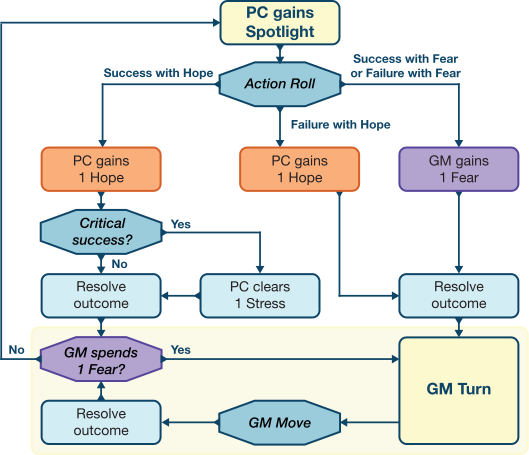
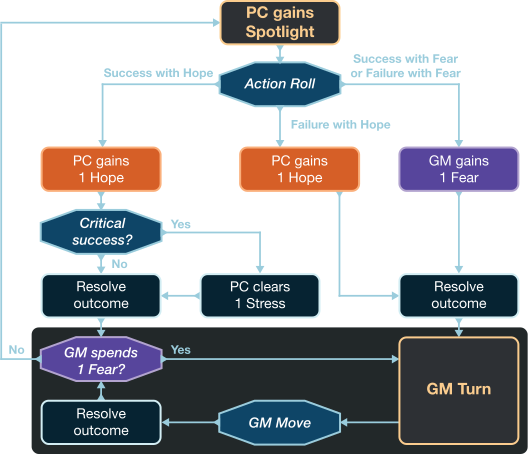
Daggerheart is a conversation. The goal is to build on everyone's ideas to tell a satisfying story. The core gameplay loop provides structure to the conversation, and mechanics for resolving fate or fortune's impact on the outcome.
Hope and Fear represent the cosmic forces that shape the events of the story. Hope powers PC abilities and features, while Fear powers GM moves, including actions taken by adversaries and environments.
The results of action rolls determine what happens next, and how the outcome is resolved. On a success with Hope, a PC usually gains the spotlight. On a failure or a roll with Fear, a GM Turn begins.
Core Gameplay Loop
- DH Core 88
- DH Core 90
The core gameplay loop is the procedure that drives every scene, both in and out of combat.
Step 1: Set the Scene
The GM describes a scenario, establishing the surroundings, and any dangers, NPCs, or other important details the PCs would notice.
Step 2: Ask and Answer Questions
The players ask questions to explore the scene more deeply, gathering information that informs their action. The GM responds to these questions by giving the players information the PCs would already know or could easily obtain, or by asking questions of the players.
Step 3: Build on the Fiction
As the scene develops, the PCs take action—solving problems, overcoming obstacles, and uncovering mysteries. If an action has no chance of failure (or if failure would be boring), they succeed automatically. If the outcome of an action is unknown, the GM calls for an action roll. Either way, the outcome becomes part of the story. The GM resolves the outcome, narrating how the PC's action changes things.
Step 4: Go Back to Step 1
The process repeats, until the end of the scene is triggered by a mechanic or arrives organically.
Foundational Rules
The Golden Rule
- DH Core 7
The most important rule of Daggerheart is to make the game your own. The rules are designed to help you enjoy the experience, but everyone has a different approach to interpreting rules and telling stories. The rules shouldn't get in the way of the story you want to tell, the character you want to play, or the adventure you want to have. If the players and GM agree to a change, anything in the rules can be ignored or adjusted.
Rulings Over Rules
- DH Core 7
The rules offer answers for many questions, but it won't answer all of them. When in doubt, the GM makes a ruling that aligns with the narrative.
The GM has the authority—and responsibility—to ensure rules are applied in an interesting, logical, and story-based manner.
Additional Rules
- DH Core 107
The following rules are assumed, unless stated otherwise by a specific feature.
Rounding Up
- DH Core 107
Round up to the nearest whole number. Resolve any ambiguity in favor of the PCs.
Spending Resources
- DH Core 94
- DH Core 96
- DH Core 107
- Using Features After a Roll
- Features that provide bonuses or benefits must be added before you make the related action roll, reaction roll, or damage roll. If a feature allows you to affect the outcome of a roll, you can use it after the GM announces if the roll succeeds or fails, but not after the roll's narrative consequences unfold, or another roll is made.
- Spending to Increase Effects
- You can't spend Hope or mark Stress multiple times on the same feature to increase or repeat its effects on a single roll.
Editor's Notes — This prohibition on spending to increase effects only applies to features that affect one roll. It doesn't apply to features that affect multiple rolls. For example, a Warrior can spend 6 Hope on their No Mercy feature to gain a +2 bonus to attack rolls until their next rest.
Rerolling Dice
- DH Core 107
If a feature allows you to reroll a die, you take the new result.
Targeting
- DH Core 104
A target is anything a feature affects. Most of the time, you can choose the target, including who (a creature) or what (an object) is affected. Creatures are living beings—you, your fellow PCs, and adversaries and NPCs you encounter. Some features can only target creatures that are allies, and others only creatures that are adversaries. Some features affect multiple creatures in an area with a single attack roll—for example, the Rain of Blades domain card.
Editor's Notes — Since several features target "you or an ally", or "yourself or an ally", you probably don't count as your own ally. These features must be used on an allied character—usually another PC.
Some features have two types of "target": those that are the target of an action roll, and those who might be affected by the action roll—for example, a Fireball created by the Book of Norai domain card targets one creature with a Spellcast Roll. If that roll succeeds, the resulting effect targets all creature within Very Close range of the original target.
Resolution
- DH Core 102
- DH Core 107
- DH Core 153
- Editorial Addition
- Multiple Effects
- You can maintain the effects from more than one class feature or domain card at a time. If the resolution order of multiple effects is unclear, whoever is in control of the effects (player or GM) decides what order to resolve them in. The effects must be able to resolve in the order assigned—for example, if you take Major damage and use a feature that reduces damage taken by one threshold to Minor, and then second effect requires you to have taken Major damage, the two effects can't be resolved—at least not in that order. The GM arbitrates any uncertainty.
- Stacking Effects
- Effects stack, with three important exceptions:
- Temporary and Ongoing Effects
- If an effect doesn't define when it ends, it ends when you decide or the fiction demands it. If the GM or an adversary creates a temporary effect, you can try to end it with an action roll. The GM can spend a Fear to end a temporary effect created by your features or domain cards.
The Spotlight
- DH Core 100
In the flow of the game—including combat—the spotlight is where the next decisive narrative moment in the scene takes place. There's no set number of moves you can make when you gain the spotlight. If there's no roll involved, the spotlight swings toward whoever or whatever the fiction would naturally turn it, or toward someone who hasn't had the spotlight in a while.
However, once you make an action roll, the cosmic forces of Hope and Fear determine the who gains the spotlight next. If you fail an action roll or roll with fear, a GM turn begins.
GM Turns
- DH Core 89
- Editorial Addition
During GM turns, spotlight, you can't make moves—including using features that require spending Hope, marking Stress, exchanging domain cards between your loadout and vault, or make rolls unless stated otherwise. Features that allow you to make moves during a GM turn usually have a mechanical trigger—For example, the Warrior class feature Attack of Opportunity requires an adversary within Melee range to attempt to leave that range.
Editor's Notes — Combining the Spotlight Tracker Tool with a Countdown that ticks down whenever players spend an action token could be an interesting way of creating a high-pressure situation.
Additional restrictions on GM turn activity are based on a comment by designer by Spenser Starke.
See: r/daggerheart: Can you recall domain cards to your loadout during GM's spotlight?
Moves and Actions
- DH Core 89
Any time you take an action to advance the story—speaking with another character, interacting with the environment, making an attack, casting a spell, or using a class feature—you are making a move.
Action Rolls
- DH Core 90
- DH Core 94
- DH Core 148
- DH Core 149
- DH Core 160
A move where success would be trivial or failure would be boring automatically succeeds. A move that's difficult or risky triggers an action roll.
Duality Dice
Action rolls require two distinct d12s called Duality Dice. One represents Hope, and the other Fear. Roll the Duality Dice, sum the results, and apply relevant modifiers. Next, compare the result of the Hope Die and Fear Die, announcing which is higher. The GM compares the total to the Difficulty to determine the outcome.
| Difficulty | Higher Hope Die | Higher Fear Die |
|---|---|---|
| Meets or beats | Success with Hope: You gain a Hope. | Success with Fear: There's a cost or complication along with your success. The GM gains a Fear and the spotlight. |
| Less than | Failure with Hope: A minor consequence. You gain a Hope. The GM gains the spotlight. | Failure with Fear: A major consequence. The GM gains a Fear and the spotlight. |
Critical Success
If your Duality Dice results are equal, the result is Critical Success (Crit), a special kind of Success with Hope. In addition to gaining 1 Hope, the outcome exceeds your expectations, and you clear 1 Stress. If the roll is an attack roll, it deals critical damage.
The GM's Die
When an adversary opposes the PCs, the GM rolls the GM's Die—a d20—instead of Duality Dice, applying appropriate modifiers to the result.
Action Roll Procedure
- DH Core 92
- DH Core 93
- DH Core 94
- DH Core 95
The following steps describe in more detail the procedure for making an action roll:
Step 1: Pick an Appropriate Trait
Some actions and effects specify in their description which trait applies to the roll. Otherwise, the GM assigns the trait (or traits) apply. If multiple traits are assigned, choose one.
Step 2: Determine the Difficulty
Some actions assign a Difficulty. Otherwise, the GM determines the Difficulty, and can choose to announce it. Either way, the GM should communicate the consequences of failure.
Step 3: Apply Bonus Dice and Modifiers
Apply appropriate bonus dice and modifiers, for example, if you Utilize an Experience, or have advantage.
Step 4: Roll the Dice
Roll your Duality Dice, add the modifiers, and announce the roll in the format of [total] with [Hope or Fear]—or Critical Success!.
For example, you make an action roll with a +1 in the relevant trait, and no other modifiers. You roll the Duality Dice and get a result of 12 on your Hope Die and 1 on your Fear Die. You then announce "I rolled a 14 with Hope!"
Step 5: Resolve the Outcome
Every time you make an action roll, the scene changes—there are no such rolls where "nothing happens". You and the GM work together—along with everyone else—to resolve the action and swing the spotlight accordingly.
Special Rolls
- DH Core 96
There are a few special kinds of action rolls that modify the usual procedure: trait rolls, Spellcast Rolls, group action rolls, and tag team rolls. In the section on combat, two other types of rolls are defined: attack rolls and damage rolls.
Trait Rolls
- DH Core 96
Trait rolls define the trait modifier that applies to an action roll.
For example, Agility Roll (12) means the action roll adds your Agility, and has a Difficulty of 12. If no trait or Difficulty is specified, the GM assigns them.
Features and effects that affect trait rolls also affect any action roll that uses that trait, including attack rolls and Spellcast Rolls.
Spellcast Rolls
- DH Core 96
Spellcast Rolls are trait rolls that require you to use your Spellcast trait. If you have a Spellcast trait, it is determined by your subclass. A successful Spellcast Roll activates the effect described by the feature.
For example, if you are a troubadour bard and must make a Spellcast Roll (15), that means you add your Presence to the action roll, which has a Difficulty of 15. If no Difficulty is specified, the GM decides it.
A Spellcast Roll that can damage a target is also an attack roll.
Reaction Rolls
- DH Core 99
- DH Core 148
- DH Core 161
A reaction roll is made in response to a triggering event, regardless of who has the spotlight. Most reaction rolls are made in response to an attack or a hazard, representing a character's attempt to avoid or withstand an imminent effect.
For example, if you must make an Agility Reaction Roll (14), that means you add your Agility to the roll, which has a Difficulty of 14. If the trait or Difficulty aren't specified, the GM assigns them.
Reaction rolls don't generate Hope or Fear, don't trigger additional GM moves, and other characters can't aid you with Help an Ally.
If you critically succeed on a reaction roll, you don't clear a Stress or gain a Hope, but you do ignore any effects that would have impacted you—for example, taking damage or marking Stress.
When the GM rolls a natural 20 on the GM's die for an adversary's reaction roll, the adversary automatically succeeds.
Group Action Rolls
- DH Core 97
When multiple PCs take action together, the party chooses someone to lead the action. The other players describe how their character cooperates on the task, and the leader makes an action roll. Then, the cooperating PCs each make reaction rolls. The leader's action roll is modified based on each contributing reaction roll result:
| Reaction Roll Result | Modifier |
|---|---|
| Success | +1 |
| Failure | −1 |
Tag Team Rolls
- DH Core 97
A PC can spend 3 Hope to initiate a Tag Team Roll involving another PC. The two players work together to describe how they coordinate their actions. Each player makes an action roll, and they choose one roll's results to apply to the Tag Team Roll.
On a roll with Hope, all PCs involved gain a Hope. On a roll with Fear, the GM gains a Fear for each PC.
If the Tag Team Roll is a successful attack, each PC make a damage roll and add their totals together to determine the damage dealt. If the attacks deal different damage type, the players choose which type is dealt.
A PC can initiate a Tag Team Roll once each session, but they can still participate in Tag Team Rolls initiated by others.
Difficulty
- DH Core 157
When a player makes an action roll, it's compared to a Difficulty.
| Difficulty | 5 | 10 | 15 | 20 | 25 | 30 |
|---|---|---|---|---|---|---|
| Description | Very Easy | Easy | Average | Hard | Very Hard | Nearly Impossible |
Many times, the game assigns a Difficulty, for example:
- Casting the Invisibility spell requires a successful Spellcast Roll with a Difficulty of 10.
- Successfully using the fungril's Fungril Network ancestry feature requires an Instinct Roll with a Difficulty of 12.
- The Difficulty of an attack roll made against an adversary is defined on their stat block.
The GM determines the Difficulty of other action rolls required by the narrative, and can modify it by spending Fear, or give the roll advantage and disadvantage based on circumstance.
Sometimes, an action sets the Difficulty for an adversary's reaction roll—for example, the Fireball spell in the Book of Norai grimoire sets a Difficulty of 13, and the Chain Lightning spell contests the adversary's reaction roll with your Spellcast Roll.
Advantage and Disadvantage
- DH Core 100
- DH Core 107
- DH Core 160
Advantage and disadvantage on a roll can be the result of features, mechanical triggers, or the GM's discretion.
- Advantage
- Advantage is opportunity that you seize to increase your chances of success. When you roll with advantage, you roll a d6 advantage die with your dice pool and add its result to your total. When an adversary rolls with advantage, the GM rolls a second GM's die and uses the higher result.
- Disadvantage
- Disadvantage is additional difficulty, hardship, or challenge you face when attempting an action. When you roll with disadvantage, you roll a d6 disadvantage die with your dice pool and subtract its result from your total. When an adversary rolls with disadvantage, the GM rolls a second GM's die and uses the lower result.
- Multiple Sources of Advantage and Disadvantage
- Advantage and disadvantage dice don't stack. Each source of advantageous or disadvantage cancels the other out—for example, if you have two sources of disadvantage, you roll one disadvantage die.
- Disadvantage and Bonus d6s
- A source of disadvantage also cancels other d6 bonus dice—for example, d6 Rally Dice and Slayer Dice. Other types of bonus dice are not advantage dice, so you can roll them alongside an advantage die, applying both results to your action roll.
- Help From Allies
- If another PC uses the Help an Ally move to aid you, they roll their own advantage die, and if you have advantage, you roll yours. After all advantage dice are rolled, keep only the highest advantage die's result as the bonus to your roll.
Countdowns
- DH Core 162
Countdowns represent a period of time or series of events that lead to a future event.
A Countdown begins with a starting value—for example, Countdown (3). Each time a counter ticks down, subtract 1 from its value. When the counter reaches 0, its effects are triggered.
- Standard and Dynamic
- Most countdowns tick down each time a player makes a relevant action roll. Standard countdowns tick down by 1. Dynamic Countdowns tick down by 1–3, depending on the results.
- Consequence and Progress
- Consequences leads to negative effects, and Progress leads to positive effects. These can be Linked—after one countdown reaches 0, the other ends without effect.
- Loop
- After triggering, the Countdown resets, possibly increasing or decreasing its starting or maximum value by 1.
- Long-Term
- Ticks down after long rests instead of action rolls.
- Randomized
- Randomized starting values.
Dynamic Countdowns
- DH Core 163
The GM might also use the results of action rolls to determine changes to a countdown, as shown in the Cliffside Ascent environment. If a Progress Countdown and Consequence Countdown are linked, tick each down differently:
| Roll Result | Progress Countdown | Consequence Countdown |
|---|---|---|
| Failure with Fear | — (or +1) | −3 |
| Failure with Hope | — | −2 |
| Success with Fear | −1 | −1 |
| Success with Hope | −2 | — |
| Critical Success | −3 | — (or +1) |
Optional Rules
- Adversary Transformations
- Building Villains Collaboratively
- Collosal Adversaries
- Conflict Between PCs (PVP)
- Corruption from the Witherwild
- Curses
- Defined Ranges
- Doom Track
- Factions
- Falling and Collision Damage
- Fate Rolls
- Feasts
- Flight Artifacts
- Gold Coins
- The Hex Crawl
- The Hunt
- Iconic Weapons
- Less Lethal Campaigns
- Massive Damage
- Moving and Fighting Underwater
- Sacred Bonfires and Torches
- Spotlight Tracker Tool
- Transformations
- Tech Damage
- Adversary Transformations
- Building Villains Collaboratively
- Collosal Adversaries
- Conflict Between PCs (PVP)
- Corruption from the Witherwild
- Curses
- Defined Ranges
- Doom Track
- Factions
- Falling and Collision Damage
- Fate Rolls
- Feasts
- Flight Artifacts
- Gold Coins
- The Hex Crawl
- The Hunt
- Iconic Weapons
- Less Lethal Campaigns
- Massive Damage
- Moving and Fighting Underwater
- Sacred Bonfires and Torches
- Spotlight Tracker Tool
- Transformations
- Tech Damage
Building Villains Collaboratively
- DH HF 135
- DH HF 136
- DH HF 184
- DH HF 185
Before session zero, the GM writes 40 prompts, each in the form of a question about the villain's background, demeanor, motives, or reputation.
At session zero, the GM presents the players with 15 random prompts. Each player draws a prompt, reads it aloud, and chooses one of the following options:
- Answer
- Other players can ask follow-up questions. The player doesn't have to answer them.
- Remove
- Discard the prompt, and draw a new one.
- Pass
- The prompt is given to another player, who can answer, remove, or pass it.
Once no prompts remain to draw, and there are no follow-up questions, proceed to character creation.
Editor's Notes — Darrington press provides an official Reign of the Weredragon Villain Builder in their free Campaign Frame Materials (Hope & Fear).
Conflict Between PCs (PVP)
- DH Core 168
If a PC acts against another PC in the scene, don't jumping to rolling dice. Instead, discuss the situation to decide how to resolve the conflict. A roll might not be necessary to reach an outcome. If it's decided that rolling will be fun for everyone, come to a consensus on the terms of the roll, then resolve the action.
An attack roll against a PC is compared to their Evasion. For other kinds of action rolls, the result is compared to a reaction roll made by the target, with the higher result determining who succeeds.
Falling and Collision Damage
- DH Core 168
If a character falls or collides with something at high speed, the GM might use the range fallen to determine how much physical damage the collision inflicts.
| Fall Distance | Damage |
|---|---|
| Very Close | 1d10+3 |
| Close | 1d20+5 |
| Far or Very Far | 1d100+15 (or death, at the GM's discretion) |
| Collision at Dangerous Speed | 1d20+5 direct damage |
Doom Track
- DH HF 177
- DH HF 186
The GM can use a Doom Track to plan and enact growing disasters that befall the world if the party acts too slowly, similar to a countdown.
To use a Doom Track, create a nested list of consequences, and mark one at the end of each session, then enact its consequences in the world. You can't mark a nested box until you mark its parent box. As the story develops, the GM can increase the number of boxes they mark—especially during a shorter campaign.
Editor's Notes — Darrington press provides an official Doom Track for the Journey to Horizon campaign frame in their free Campaign Frame Materials (Hope & Fear).
Fate Rolls
- DH Core 168
If the GM wants to leave an outcome up to chance, they call for a fate roll. The GM instructs a player to roll one of their Duality Dice—the Hope Die or the Fear Die—and establishes how the roll will be interpreted.
Factions
- DH Core 268
- Name
- What the faction is called.
- Relationships
- The faction's relationship rank with other factions.
- Assets
- 1–3 advantages—for example, a large military or access to superior technology.
- Problems
- 1–3 disadvantages—for example, a small territory or negative reputation.
- Major Objectives
- 1–3 critical objectives the faction would expend significant resources to achieve—for example, establishing a new trade route.
- Minor Objectives
- 1–3 less critical objectives the faction would like to achieve—for example, mounting a festival or implementing a civic project.
Faction Tracking
- DH Core 268
The GM can represent relationship between two factions with a number between −3 and +3. The more intense the relationship, the more willing a faction is to act on behalf of or against the another, even at risk to itself. A Friendly (+1) faction might render help if it doesn't require much effort or risk. A faction will go to great effort and expense to see its Nemeses (−3) suffer.
| Relationship | Description |
|---|---|
| −3 | Nemeses |
| −2 | Opposed |
| −1 | Unfriendly |
| 0 | Neutral, Ambiguous, or Ambivalent |
| +1 | Friendly |
| +2 | Allied |
| +3 | Close Allies |
Faction Objectives
- DH Core 269
The GM can use long-term countdowns to track how a faction's uses assets, addresses problems, and pursues objectives. A faction can have a maximum of three active countdowns: one Major Objective Countdown (10), and two for Minor Objectives Countdowns (4–6).
Each in-game week, advance or tick down one countdown for each faction by one or more steps. When a countdown triggers, the faction acquires an asset, removes a problem, or achieves some other objective. Pick a new goal based on the fiction and start a new countdown.
Stagger faction countdown progression so that only a few trigger each in-game week. Triggering too many can cause weeks of inactivity.
The party can be dispatched to complete faction objectives, or to prevent another faction from completeing theirs.
The Hunt
- DH HF 154
The Hunt is a five-stage procedure for making a monster and allowing the players to gather Liminal Clues about it. Start by asking the following questions about the monster:
The answer to this last question might involve underlings that serve the monster, important bystanders the monster might endanger, or events and location that might highlight the monster's strengths, weaknesses, and motivations.
Stages of The Hunt
- Stage 1: Arrival
- The PCs are hooked into the adventure with a strange event that implies monster activity.
- Stage 2: Investigation
- The PCs follow leads and gather Liminal Clues to discover the truth of the monster.
- Stage 3: Escalation
- The PCs bring together what they've discovered about the monster and develop a plan of action for finding and defeating it.
- Stage 4: Confrontation
- The PCs attempt to banish, bind, or destroy the monster using what they've previously learned.
- Stage 5: Epilogue
- The PCs wrap up loose ends and move on to their next mission.
Liminal Clues
- DH HF 154
A Liminal Clue is a piece of evidence or information that exists in potential—it manifests when the party discovers it during the Hunt. Before a session begins, the GM should devise 4–6 Liminal Clues that allow the party to start to answering at one of questions about the Hunt.
When the PCs delve into danger or explore the mystery in a significant way, the GM provides a related Liminal Clue.
A Liminal Clue indicates what manifests, not how or where. They aren't bound to a place or method of discovery. Once revealed, a Liminal Clue solidifies as an undeniable discovery—part of the world's reality.
Feasts
- DH Core 277
In a feast-based campaign, players can't use downtime moves to clear Stress, clear Hit Points, or gain Hope. Instead, they have a new downtime move: Make a Feast. Feasts are made from the flavor of ingredients the PCs collect in the story.
Ingredients
- DH Core 277
- DH Core 278
You acquired from defeated creatures or the environment. You can carry a number of ingredients equal to your highest trait.
Each ingredient has a name and a flavor profile—for example, Mushroom caps: Savory (2), Bitter (1).
Hunting
When an edible adversary is defeated, the PCs can harvest ingredients from it. The number of ingredients is determined by the defeated creature's Hit Points.
- Less powerful adversaries yield Sweet, Salty, and Bitter ingredients.
- More powerful adversaries yield Sour, Savory, and Weird ingredients.
| Hit Points | Ingredients |
|---|---|
| 1–4 | 1 |
| 5–7 | 2 |
| 8–10 | 3 |
| 12+ | 4 |
Gathering
Once per rest, each PC can spend a Hope to gather ingredients from the environment. The GM determines what you acquire based on the fiction or by having you roll your Hope Die and consulting the following table:
| Hope Die Result | Ingredient Flavor |
|---|---|
| 1–2 | Sweet (1) |
| 3–4 | Salty (1) |
| 5–6 | Bitter (1) |
| 7–8 | Sour (1) |
| 9–10 | Savory (1) |
| 11–12 | Weird (1) |
Ingredient Generator
When the PCs harvest an ingredient, you can roll a d20 for applicable columns, and use the combination to inspire what is gatherered.
| d20 | Hunting | Gathering | Feature |
|---|---|---|---|
| 1 | Feet | Flower | It's particularly tender. |
| 2 | Powder | Roots | It's still wriggling. |
| 3 | Limb | Stems | It looks like something it isn't |
| 4 | Belly | Leaves | It has a pungent smell. |
| 5 | Fat | Bulbs | It's brightly colored. |
| 6 | Eggs | Nuts | It's completely translucent. |
| 7 | Marrow | Seeds | It's an odd size or shape. |
| 8 | Tongue | Bark | It has unique markings. |
| 9 | Brain | Berries | It recoils from the light. |
| 10 | Ribs | Fruit | It withers in the dark. |
| 11 | Organ | Sap | It smells unbelievably good. |
| 12 | Flesh | Pollen | It has an unexpected texture. |
| 13 | Stones | Fungi | It's encased in something. |
| 14 | Eyes | Nectar | It's filled with something. |
| 15 | Jelly | Pods | It's emitting a colorful gas. |
| 16 | Horn | Herbs | It comes apart in layers. |
| 17 | Meat | Algae | It must be prepared in a strange way. |
| 18 | Scales | Moss | It's leathery or cartilaginous. |
| 19 | Wings | Grain | It's brittle. |
| 20 | Secretion | Rind | It's deadly when consumed raw. |
Flavors
- DH Core 277
- DH Core 278
- DH Core 279
There are six flavors, each of which is represented by an associated die size. Each ingredient has flavors with a strength rating of 1–3.
| Flavor | Die |
|---|---|
| Sweet | d4 |
| Salty | d6 |
| Bitter | d8 |
| Sour | d10 |
| Savory | d12 |
| Weird | d20 |
Example Ingredients
Once the party is comfortable with fasts, the GM can provide opportunities to locate rare ingredients with features—usually by harvesting them from Leader or Solo adversaries.
| Ingredient | Flavor | Feature | Acid dragon saliva | Sour (1) | — | Cave boar milk | Savory (1), Salty (1) | — | Deathflower | Bitter (2) | Risky: If you finish preparing a dish with this ingredient and have no matching sets of flavor dice, you clear all Hit Points and Stress and gain 3 Hope. Otherwise, the dish's Meal Rating is 0 and you must make a death move. | Direbear meat | Savory (3) | — | Diregazelle Skull Marrow | Sour (1), Salty (1), Sweet (1) | Built for Speed: +1 bonus to Agility until your next rest | Ghost Scorpion Venom | Sour (1), Savory (1) | Spicy: If any matching sets from a dish prepared with this ingredient are worth 8 or more points, you can't clear Stress from consuming the resulting dish. | Holy Cow's Milk | Weird (1) | Last Drop: When you prepare a dish with this ingredient and there's only one remaining die in the flavor pool, roll it and add the result to the dish's Meal Rating. | Mushroom caps | Savory (2), Bitter (1) | — | Ogre kidney stone | Weird (1), Sweet (1) | — | Ooze marrow | Bitter (2), Sweet (1) | — | Rileroot | Bitter (1) | — | Wyvern tongue | Weird (1), Savory (1), Sour (1) | — |
|---|
Downtime Move: Make a Feast
- DH Core 278
Each PC who chooses this downtime move can remove ingredients from their inventory and contribute them to the meal.
- Preparation
- The party designates a PC to be the chef. The chef reviews the ingredients and determines the total number of flavor dice.
| Ingredient | Flavor | Flavor Dice | Direbear meat | Savory (3) | 3d12 | Mushroom caps | Savory (2), Bitter (1) | 2d12 + 1d8 | Ooze marrow | Bitter (2), Sweet (1) | 2d8 + 1d4 | Total | — | 5d12 + 3d8 + 1d4 |
|---|
- Cooking Rolls
- The chef makes a Cooking Roll by rolling the flavor pool's dice and setting aside pairs of matching values. If there are no matching values, the chef discards a die of their choice. The chef continues repeats the process until all dice are discarded or set aside, or there is only one unmatched die.
- Meal Rating
- The chef totals each pair of dice they set aside—for example, d6 and d8 that matched at a value of 6 contributes 6 points to the total Meal Rating.
- Eating the Feast
- Each PC who partakes in the meal can clear a number of Hit Points, clear a number of Stress, and gain a number of Hope so that the total of all three numbers is equal to or less than the Meal Rating—with a meal rating of 8, a PC can choose to clear 5 Hit Points and 2 Stress, and gain 2 Hope.
Recording Recipes
- DH Core 277
The players can record a cookbook with recipe for each dish they prepare. A recipe includes:
- A name, description, and preparation method
- An ingredients list
- A resulting Meal Rating
When the party cooks a dish with the same flavor profile as a recipe in their cookbook, add a number of tokens equal to their tier to the Flavor Pool. When the chef would be forced to discard a die after a Cooking Roll, they can remove a token instead, making meals with the same flavor profile easier to to prepare.
Restaurants
- DH Core 279
You can spend up to 2 handfuls of gold during downtime to order food from a nearby restaurant. When you do, you gain the effects of the Tend to Wounds, Clear Stress, or Prepare downtime move (your choice) for each handful spent.
Flight Artifacts
- DH HF 127
PCs gain magic artifact they can use to fly, allowing them to move in any direction. PC flight might lose thier ability to fly if they are Restrained, Vulnerable, or if they lose their magic artifact.
PCs can use any appropriate trait to fly:
- Agility
- Swift acrobatics, speed-boosting off an adversary's wake, maintaining an aerodynamic posture, or angling past a winged threat
- Finesse
- Focused, subtle, and well-timed adjustments, threading the needle, precision flying, operating finely tuned controls, or deftly weaving between obstacles
- Strength
- Blasting through floating debris, holding fast in shifting weather, or slamming into a racing rival
- Instinct
- Navigating by sheer intuition, keenly spotting a shortcut, following a migratory current, or sensing hidden danger in the clouds.
- Presence
- Flying with natural grace and effortless style, commanding attention, causing a distraction, creating a spectacle
- Knowledge
- Charting efficient flight plans, plotting rotational momentum, or deducing the exact timing of a foe's wingbeats
The Hex Crawl
- DH HF 169
- DH HF 176
A hex crawl uses a map divided into 24-mile (38.6 km) hexagons to represent a large area. The PCs travel through wildernesses between sanctuaries, resolving encounters along the way.
- Key Map and Player Map
- The GM chooses the contents of each hex or procedurally generates them, ensuring enough for the PCs to explore in the next session. The PCs are capable wayfinders and trailblazers. As they explore, players fill out their own map and track their location. The GM provides information about the hex they're in, and anything they can learn about adjacent hexes—for example, a tall tower.
- Downtime
- A party can take three one-day short rests while traveling. Taking a long rest requires multiple days spent in a sanctuary.
- Endurance Countdowns
- The GM can complicate wilderness travel by assigning each PC an Endurance Countdown (6) at the end of a rest. When the party enters a hex, each player rolls their Hope Die, and if the result is equal to or less than the value of their Endurance Countdown, they mark a Stress. Otherwise, their Endurance Countdown ticks down. When a PC's Endurance Countdown triggers, they become Vulnerable until their next rest. At the start of a rest, Endurance Countdowns end.
Filling Hexes
- DH HF 170
- DH HF 176
Start in any hex and fill out the key map:
- Roll a d20 to determine habitat.
- Roll a d12 to determine the number of contiguous hexes the region covers. The region can be any shape that doesn't encircle empty hexes.
- Roll a d8 + d6 to determine an encounter the party might face.
- Roll a d4 to determine the terrain of the region, which determines Travel Days required to enter the hex.
- Optionally, include a point of interest a specific hex within it—for example, a settlment or sanctuary. Alternatively, include a rumour about the region. The GM decides how true a rumor is, and whether the PCs learn of it.
Editor's Notes — Journey to Horizon presents a d100 rumor table on DH HF 172–173.
Habitat
- DH HF 170
| d20 | Habitat |
|---|---|
| 1 | Blighted by Dark Magic. Roll again to determine which kind of habitat has been blighted. If you roll another 1, the entire region is so corrupted that it's become nigh impossible to traverse. |
| 2 | Underground |
| 3–4 | Aquatic |
| 5–6 | Wetland |
| 7–8 | Grassland |
| 9–10 | Tropical |
| 11–12 | Forest |
| 13–14 | Drylands |
| 15–16 | Rolling |
| 17–18 | Mountain |
| 19 | Frozen |
| 20 | Badlands |
Encounters
- DH HF 171
- DH HF 176
When the party enters a hex, the GM rolls a number of d6s equal to the hex's terrain rating. If any dice result in a 1, the PCs face an encounter. The GM can also spend Fear to create an encounter, or change dice rolled to reflect regional danger, or add habitat features to adversaries in dangerous areas.
| d8 + d6 | Encounter |
|---|---|
| 2 | Roll twice and combine the resulting entries. |
| 3 | Fellow travelers |
| 4 | Temporary setback |
| 5 | Powerful adversaries |
| 6 | Extreme weather |
| 7 | Potential adversaries |
| 8 | Territorial beast or pack of creatures |
| 9 | Environmental hazard or obstacle |
| 10 | Enemy NPCs |
| 11 | Wondrous or dangerous site |
| 12 | Lucky break |
| 13 | Settlement or outpost |
| 14 | Loot or treasure |
Terrain and Travel Days
- DH HF 171
- DH HF 176
During a travel day, the PCs:
- Break camp, eat breakfast, and pack up shortly before sunrise.
- Travel overland for about 6–8 hours.
- Take a short break at midday to eat and get their bearings.
- Travel overland for another 6–8 hours until about sundown.
- Make camp, prepare and eat dinner, set a watch, and bed down for the night.
- Rivers
- PCs can traverse rivers on an appropriate conveyance—for example, a boat or canoe. Moving downstream reduces the terrain rating 1. Traveling upstream increases it by 1.
- Ocean
- The party can travel through ocean hexes if on an appropriate conveyance—for example, a sailboat. When the PCs enter an ocean hex, roll a d4 to determine ocean conditions.
| d4 | Overland Terrain | Ocean Conditions | Travel Time | 1 | Optimal | Tailwind | 1 day | 2 | Fair | Fair weather | 2 days | 3 | Rough | Rough waters | 3 days | 4 | Extreme | Extreme weather | 4 days |
|---|
Iconic Weapons
- DH Core 301
Iconic weapons are are two-handed weapons that replace primary and secondary weapons in a campaign. Much of this optional rule implies a tech-based setting like Motherboard.
Iconic Weapon Features
Bonded: Gain a bonus to your damage rolls equal to your level.
Upgrade Slots: This weapon has a number of upgrade slots equal to your tier + 1. During downtime, you can break an upgrade into its components parts, craft new upgrades, and remove or install upgades.
Designing Your Iconinc Weapon
- Identity
- Choose a name and description for your iconic weapon.
- Trait, Range and Damage
- Assign it a trait, a range and corresponding damage roll according to the following table.
- Damage Type
- The GM might allow you to choose your iconic weapon's damage type, or assign something specific—for example, tech damage.
- Tech Link
- If this is a tech-based campaign, you gain a Tech Link at character creation—a data cable with a hook on one end. You must use it to connect to a worldwide data and energy network to use downtime moves.
- Parts, Scrap, and Credits
- You can recover parts as Scrap—usually from from defeated tech-based adversaries. Scrap is used to craft upgrades during downtime, and has has a barter value in Credits, which you can use to exchange for parts you don't have.
Iconic Weapon Range and Damage
| Range | Damage |
|---|---|
| Melee | d12+1 |
| Very Close | d10+2 |
| Close | d10 |
| Far | d8+1 |
| Very Far | d6+1 |
Editor's Notes — Darrington press provides an official Ikonis Weapon Builder for the Motherboard campaign frame in their free Campaign Frame Materials (Core) with examples of iconic weapon upgrades. Additional ideas for features are indexed in the PC Benchmarks.
Crafting and Trading
Scavenging
- DH Core 302
The GM can use the following table as general guidance for Scrap rewards after encounters:
| Adversaries | Easy | Standard | Difficult | Very Difficult |
|---|---|---|---|---|
| Slightly tech-based | Shards (2) | Shards (2), Metal (1) | Shards (2), Metal (1), Component (1) | Shard (2), Metal (2), Component (1) |
| Mostly tech-based | Shards (2), Metal (1) | Shards (2), Metal (2), Component (1) | Shards (3), Metal (2), Component (1) | Shards (3), Metal (3), Component (2) |
| All tech-based | Shards (2), Metal (1), Component (1) | Shards (3), Metal (2), Component (2) | Shards (3), Metal (3), Component (2) | Shards (4), Metal (3), Component (3) |
Scrap and Relics
- DH Core 301
- DH Core 302
- DH Core 303
Most scrap has a value equal to its roll result. Some results advance to a higher level part.
- Relics
- Relics are usually earned by defeating specific—tech based—adversaries or other challenges. Relics are worth 20 Credits, and can be used to craft powerful upgrades.
If a part lists a value in parenthesis, the credit value of the result what is listed, and higher than the roll outcome.
| Result | Shards (d6) | Metals (d8) | Components (d10) |
|---|---|---|---|
| 1 | Gear | ||
| 2 | Coil | Aluminum | Fuse |
| 3 | Wire | ||
| 4 | Trigger | Copper | |
| 5 | Lens | Cobalt | Circuit |
| 6 | Crystal | Silver | |
| 7 | — | Platinum | Disc |
| 8 | — | Gold | Relay |
| 9 | — | — | Capacitor |
| 10 | — | — | Battery |
Moving and Fighting Underwater
- DH Core 168
By default, attack rolls made while an attacker is underwater have disadvantage.
For characters that can't breathe underwater, use a Countdown (3) to track how long you can hold their breath. The Countdown ticks down whenever the character take an action.
While a PC remains underwater, if they fail a roll or rolls with Fear, the GM can spend a GM move to tick down their Countdown—twice on a failure with Fear.
Sacred Bonfires and Torches
- DH Core 288
Sacred Bonfires are vibrant magical pyres lit by the flames of rare and magical Sacred Torches, each of which carries a fragment of divine power. Sacred Bonfires burn out unless continuously provided with a bit of kindling, and can't be reignited without a Sacred Torch.
When a Sacred Bonfire is relit, each PC present gains 3 Hope. A Sacred Bonfire's light repels all but the most powerful monsters from its immediate vicinity.
Combat
- DH Core 91
Daggerheart relies on the same flow of the game in and out of combat, but physical conflicts rely more heavily on mechanics related to attacking, maneuvering, and taking damage.
Evasion
- DH Core 91
Evasion represents your ability to avoid attacks and other unwanted effects. Attack rolls against you have a Difficulty equal to your Evasion.
Your starting Evasion is determined by your class. You can purchase an advancement to increase your Evasion when you gain a level.
Attack Rolls
- DH Core 96
- DH Core 104
- DH Core 148
- DH Core 160
An attack roll is an action roll intended to inflict harm. The trait you use for your attack roll is determined by your weapon or Spellcast trait. If the result meets or beats the target adversary's Difficulty, you succeed and roll the attack's damage dice.
- Adversary Attacks
- When an adversary attacks you, the GM rolls the GM's die and adds the adversary's attack bonus. If the result meets or beats your Evasion, the attack succeeds and they roll the attack's damage dice. If the GM's die results in a natural 20, the attack succeeds automatically and deals critical damage.
- Line of Sight and Cover
- A ranged attacker must have line of sight to the target unless stated otherwise. If there is a partial obstruction, the target has cover, and the attack roll has disadvantage. If the obstruction is total, there is no line of sight.
- Multiple Targets
- Make one attack roll and compare it to each target's Difficulty or Evasion. Make one damage roll and apply the results to each target the attack succeeds against.
- Area of Effect
- An area of effect originates from a point you choose, and affects a group of targets within Very Close range unless stated otherwise.
Editor's Notes — A GM might interpret "intended to harm" as any unwanted effect prompted by an action roll "against a target"—for example, the Enrapture domain card doesn't cause physical harm, but does manipulate the target's mind. The GM might interpret this wording so that only action rolls with a damage roll as a consequence count as an attack roll. This interpretation has a big impact on combinatory features like the Parallela spell in the Book of Sitil domain card.
Damage Rolls
- DH Core 96
- DH Core 98
- DH Core 110
- DH Core 113
After a successful attack roll, you make a damage roll.
- Damage Dice
- Damage dice are arranged into steps by an increasing number of faces on the die:
- d4
- d6
- d8
- d10
- d12
- d20
- Proficiency
- Your Proficiency determines the number of damage dice you roll with weapons and with features that use your Proficiency—for example, domain cards like Rain of Blades.
- Spellcast Trait
- If a feature states you deal damage using your Spellcast trait, you roll a number of dice equal to it instead—for example, domain cards like Preservation Blast. If your Spellcast trait is +0 or lower, you don't roll any dice.
- Additional Damage Roll Dice
- Some features add dice to the damage roll—for example, domain cards like Strategic Approach.
- Modifiers and Bonus Dice
- After the damage roll is made, add any modifiers to determine the result—for example, if your Proficiency is 1, and you attack with a cutlass that deals d8+1 damage, you roll 1d8 and add 1 to determine the incoming damage. Some features call for dice to be rolled separately, with the result added as a modifier—for example, the Bard class' Rally Dice.
- Critical Damage
- When you roll a critical success on an attack roll, add the maximum possible result of the damage dice to the result—for example, if the damage dice are 1d8 + 1d6 damage, add +14 to the result.
- Incoming Damage
- Incoming damage is the total damage taken or dealt from a single attack or source that is then compared to the target's damage thresholds. Some features and domain cards allow you to reduce incoming damage—for example, domain cards like Rune Ward.
Damage Types
- DH Core 98
- DH Core 99
- DH Core 107
- Physical damage (phy)
- Unarmed attacks and mundane weapons deal physical damage.
- Magic damage (mag)
- Spells and magic weapons deal magic damage.
- Direct damage
- Direct damage can be magic or physical. Either way, it can't be reduced by marking Armor Slots.
- Resistance
- Resistance to a type of damage reduces incoming damage by half before other modifiers that reduce incoming damage—for example, domain cards like Rune Ward. Resistance doesn't stack. If an effect deals both physical and magic damage, the target must be resistant to both.
- Immunity
- A target with immunity to a damage type ignores it. If an effect deals both physical and magic damage, the target must be immune to both.
- Multiple Sources of Damage
- Total simultaneous damage before comparing it to a target's damage thresholds. For example, if you are an orc who successfully attacks a target within Melee range and spend a Hope to use your Tusks feature, you roll your weapon damage and add 1d6 to the result.
Damage Thresholds and Hit Points
- DH Core 91
- Errata
Hit Points represent capacity to withstand physical injury. When a character takes incoming damage, they compare it to their damage thresholds. Your damage thresholds are determined by your armor, and gain a bonus equal to your level.
- Severe Damage
- If the damage meets or beats the Severe damage threshold, mark 3 Hit Points.
- Major Damage
- If the damage meets or beats the Major damage threshold, mark 2 Hit Points.
- Minor Damage
- If the damage is below the Major damage threshold, mark 1 Hit Point.
- Marking Hit Points
- When incoming damage would cause you to mark Hit Points, you can mark one Armor Slot instead of a Hit Point. Some features allow you to mark additional Armor slots or avoid marking Hit Points in other ways—for example, the Stalwart Guardian's Iron Will feature, and domain cards like Brace and Get Back Up.
- Death and Defeat
- If you mark your last Hit Point, make a death move. If an adversary's last Hit Point is marked, they are defeated—incapacitated, tied up, routed, killed—whatever makes sense.
- Clearing Hit Points
- You can clear marked Hit Points during downtime or by activating certain features.
- Increasing Hit Points
- Your starting Hit Points are determined by your class, but they might have been modified by your subclass or ancestry. When you gain a level, can purchase an advancement to increase your Hit Points (to a maximum of 12).
Stress
- DH Core 92
- Errata
Stress represents physical, mental, and emotional strain.
- Marking Stress
- Activating a feature might require you to mark a Stress. Additionally, the GM can require you to mark Stress as a GM move, or to represent the cost, complication, or consequence of an action roll. When a character marks their last Stress, they become Vulnerable until they clear at least 1 Stress. If all of a character's Stress slots are marked, they can't use features that require them to mark Stress, and if something else forces them to mark Stress, they mark a Hit Point instead.
- Clearing Stress
- Stress is cleared during downtime or by activating certain features.
- Increasing Stress Slots
- You start with 6 Stress slots, but they might have been modified by your subclass or ancestry. When you gain a level, can purchase an advancement to increase your Stress slots (to a maximum of 12).
Death
- DH Core 7
- DH Core 106
- DH Core 182
If you mark your last Hit Point, choose one of the following death moves:
- Blaze of Glory
- You embrace death and go out in a blaze of glory. Take one final action. With the GM's approval, your action critically succeeds. After the action is resolved, you cross through the veil of death.
- Avoid Death
- You avoid death—but there are consequences. The situation in the scene worsens. Work with the GM to describe how, and roll your Hope Die. If the result is equal to or less than your level, you gain a scar. Either way, you temporarily fall Unconscious. While you remain Unconscious, you can't move, act, or be targeted by an attack. You regain consciousness if an ally clears 1 or more of your marked Hit Points, or when the party finishes a long rest. Each time you gain a scar, you lose a Hope slot, work with the GM to determine its lasting narrative impact, and discuss if and how it can be removed. If avoiding death causes you to lose your last Hope slot, your journey ends—retire your PC to a life apart from the PCs' adventures.
- Risk It All
- Roll your Duality Dice. If the Hope Die is higher, your character stays on their feet, and you can distribute the value of the Hope Die to clear a number of Hit Points or Stress as you choose. If the Fear Die is higher, your character crosses through the veil of death. If the Duality Dice show matching results, you clear all Hit Points and Stress.
Conditions
- DH Core 102
- DH Core 154
Conditions are effects that grant specific benefits or drawbacks. Usually, the same condition can't be applied to the same target more than once.
- Hidden
- Hidden characters can't be seen, their location is unknown to their enemies, and rolls against them have disadvantage. After a creature moves to where they would be seen, move into an enemy's line of sight, or make an attacks, they are no longer Hidden.
- Restrained
- Restrained characters can't move, but can still take actions from their current position.
- Vulnerable
- Rolls against Vulnerable characters have advantage.
- Clearing Conditions
- PCs can usually clear a temporary condition with a successful trait roll. An adversary clears them with an adversary action.
- Special Conditions
- Special conditions be cleared only after specific requirements are met, for example, ending the Unconscious condition after choosing to Avoid Death requires the completion of a long rest. Some class features and domain cards apply conditions.
Class Features Applying Conditions
- Editorial Addition
| Class | Feature | Condition |
|---|---|---|
| Assassin | Marked for Death | Marked for Death |
| Bard | Bard's Hope Feature | Distracted |
| Druid | Beastform | Poisoned (Stalking Arachnid, Striking Serpent) |
| Ranger | Ranger's Focus | Focus |
| Rogue | Cloaked | Cloaked |
| Witch | Hex | Hexed |
Subclass Features Applying Conditions
- Editorial Addition
| Class | Subclass | Card | Feature | Condition |
|---|---|---|---|---|
| Warlock | Pact of the Endless | Mastery | Draining Bane | Drained |
| Witch | Moon | Foundation | Night's Glamour | Glamoured |
Domain Cards Applying Conditions
- Editorial Addition
| Level | Domain | Domain Card | Condition |
|---|---|---|---|
| 1 | Asleep | ||
| 1 | Enraptured | ||
| 2 | On Fire | ||
| 3 | Stunned | ||
| 3 | Invisible | ||
| 3 | Corroded | ||
| 4 | Chained | ||
| 5 | Silenced | ||
| 7 | Cloaked | ||
| 8 | Frenzied | ||
| 8 | Enraptured | ||
| 8 | Stunned | ||
| 9 | Horrified |
Consumables Applying Conditions
- Editorial Addition
| Consumable | Condition |
|---|---|
| Emberite Shard | Ablaze |
| Green Ooze Oil | Corroded |
| Red Ooze Oil | Ignited |
Downtime
- DH Core 105
- DH Core 181
Between conflicts, the party can rest to recover expended resources and deepen bonds. The GM should allow players to choose their own downtime scenes, which stand in contrast to the intensity of the story, giving PCs room to reflect on and roleplay responses to recent events. Describe how you mend each other's wounds, unwind, and relax together. Tell stories and exchange dialogue with each other, and any NPCs traveling with you.
While resting, you can exchange domain cards between your loadout and vault without paying a Recall Cost. You also choose two downtime moves.
- Short Rest
- A short rest lasts about an hour. If your short rest is interrupted, you don't gain your chosen downtime move benefits. At the end of a short rest, any features or effects with a limited number of uses per rest refresh, features or effects that last until your next rest expire. The GM gains 1d4 Fear. If the PCs take three short rests, the next must be a long rest.
- Long Rest
- A long rest is when you relax or sleep for several hours. If your long rest is interrupted, you gain the short rest benefits of your chosen downtime move instead. At the end of a long rest, features or effects with a limited number of uses per rest or long rest refresh, features or effects that last until your next rest or long rest expire. The GM gains Fear equal to 1d4 + the number of PCs, and can tick down a long-term countdown of their choice.
- Long-Term Projects
- With GM approval, you can start a project—for example, deciphering an ancient text, or crafting a weapon. The GM assigns a Progress Countdown based on complexity, availability of tools, and impact on the story.
- Extended Downtime
- If the GM fast-forwards the story across an extended period, they should use montages to illustrate the passage of time. The GM gains 1d6 Fear per PC, and appropriately ticks down relevant long-term countdowns.
Downtime Moves
- DH Core 105
- DH Core 181
| Downtime Move | Short Rest Benefits | Long Rest Benefits |
|---|---|---|
| Tend to Wounds | Clear 1d4 + Tier Hit Points for yourself or an ally. | Clear all Hit Points for yourself or an ally. |
| Clear Stress | Clear 1d4 + Tier Stress. | Clear all Stress. |
| Repair Armor | Clear 1d4 + Tier Armor Slots from your armor or an ally's. | Clear all Armor Slots from your armor or an ally's. |
| Prepare | Describe how you prepare yourself for the path ahead, then gain a Hope. If you prepare with another PC, you each gain 2 Hope. | Describe how you prepare yourself for the path ahead, then gain a Hope. If you prepare with another PC, you each gain 2 Hope. |
| Work on a Project | — | Each time you choose this downtime option, your project's Progress Countdown ticks down automatically, or the GM assigns an action roll. |
GM Guidance
Running an Adventure
- DH Core 140
The GM is responsible for guiding the narrative and roleplaying the world the PCs inhabit. This section provides the GM advice for running Daggerheart.
These three sections offer principles, practices, and pitfalls to avoid when running an adventure.
GM Principles
- DH Core 142
These GM Principles are the GM's guiding star—when in doubt, they should return to these principles.
- Begin and End with the Fiction
- Use the fiction to drive mechanics, then connect the mechanics back to the fiction.
- Collaborate at All Times, Especially During Conflict
- The PCs are the protagonists of the campaign; antagonism between player and GM should exist only in the fiction.
- Fill the World with Life, Wonder, and Danger
- Showcase rich cultures, take the PCs to wondrous places, and introduce them to dangerous creatures.
- Ask Questions and Incorporate the Answers
- Ensuring that the players' ideas are included results in a narrative that supports the whole group's creativity.
- Give Every Roll Impact
- Only ask the players to roll during meaningful moments.
- Play to Find Out What Happens
- Be surprised by what the characters do, the choices they make, and the people they become.
- Hold on Gently
- Don't worry if you need to abandon or alter something that came before.
GM Practices
- DH Core 144
- Cultivate a Curious Table
- Follow what catches the players' interest to foster an environment of creative inquiry.
- Gain Players' Trust
- Act in Good Faith, Follow Through on Your Promises, Admit Your Mistakes.
- Keep the Story Moving Forward
- Advance the story through escalating action, new information, or changing circumstances after every action roll, whether it succeeds or fails.
- Cut to the Action
- Skip past the boring bits. When a scene drags on, end it.
- Help the Players Use the Game
- Players have more fun when you help them understand the system.
- Create a Meta Conversation
- Empower players to speak out of character, use safety tools, and ask for clarification.
- Tell Them What They Would Know
- Don't hide obvious details or important information from the players.
- Ground the World in Motive
- An NPC's actions flow from their goals and desires.
- Bring the Game's Mechanics to Life
- Set a good example of how fiction and mechanics work together to enhance the game experience.
- Reframe Rather than Reject
- If a player's contribution conflicts with the fiction, work with them to reshape it.
- Work in Moments and Montages
- When framing a scene, decide which beats should be savored and which shouldn't linger.
Pitfalls to Avoid
- DH Core 146
- Undermining the Heroes
- If a roll doesn't go well, show how it was impacted by an adversary's prowess, environmental factors, or unexpected surprises, rather than the PC's incompetence.
- Always Telling the Players What to Roll
- Let the players decide how to handle a challenge.
- Letting Scenes Drag
- Shake it up or cut away when a scene has concluded, the table's energy is flagging, or people are talking in circles.
- Singular Solutions
- Don't get hung up on one right answer to a problem. If the players have a clever idea, make it work.
- Overplanning
- Spend your prep time inventing situations instead of scripting scenes. If the players surprise you, take a break to think through your options.
- Hoarding Fear
- Spend Fear when you have the opportunity. The players will always generate more.
Resolving Actions
- DH Core 148
- DH Core 149
- DH Core 150
After a PC makes move, the GM determines if a roll is required:
- No Roll
- The GM doesn't need to call for action roll in response to everything the PCs do. Instead, their relevant Experiences or background, the pressure they're under, or lack of interesting outcomes might mean it's better if the PC succeeds automatically. The GM might also provide the opportunity to forgo an action roll in exchange for an interesting, logical, and story-based outcome, cost, or complication.
- Action Roll
- During the action roll procedure, the GM should consider—and communicate—the stakes of the action roll—including any unavoidable consequences—before the Duality Dice are rolled. The GM then resolves the action, describing how things change, including reflecting an outcome rolled with Hope or Fear, and swinging the spotlight accordingly.
If an outcome is not obvious, the GM should try one of the following:
- Ask the player what happens
- Have the PC mark a Stress
- Tell the players "everything is fine…for now."
- Consult the list of Example GM Moves
Action Roll Resolution
| Action Roll | Phrase | Resolution |
|---|---|---|
| Success with Hope | "Yes, and…" |
|
| Success with Fear | "Yes, but…" | |
| Failure with Hope | "No, but…" | |
| Failure with Fear | "No, and…" | |
| Critical Success | "Yes, and…" |
Difficulty Benchmarks
Fear
- DH Core 91
- DH Core 153
- DH Core 154
- DH Core 156
The GM starts the game with a number of Fear equal to the number of PCs. Like Hope, Fear carries over between sessions. The GM gains Fear (to a maximum of 12) when:
- A PC rolls with Fear
- The PCs take a short rest, long rest or extended downtime
- Whenever a trigger causes it, for example, a successful attack from a Bear
The GM should devise a way for the players to know how much Fear they have.
Spending Fear
- Seize the Spotlight (1 Fear)
- The spotlight swings to the GM for a GM move.
- Make an Additional GM Move (1+ Fear)
- Make another GM move before returning the spotlight to the PCs.
- Utilize an Experience (1+ Fear)
- Add an adversary's Experience as a bonus to their action roll or as a penalty to a PC's action roll against them.
- Activate a Fear Feature (1+ Fear)
- Many adversaries and environments have Adversary Features that require spending Fear.
- End a Temporary Effect (1 Fear)
- End a temporary class feature, spell, or other effect.
Dramatic Tension
- DH Core 155
The dramatic tension of a scene correlates with the amount of Fear the GM spends during it. If the GM has a large amount of Fear, they can spend several on a GM move to create an even bigger impact.
- Spend Fast
- Spend Fear before the players have a chance to react
- Spend Often
- Spend Fear every time the spotlight swings to you
- Spend Big
- Spend Fear to make multiple GM moves in a row
This table recommends a number of Fear to spend in a scene:
| Event | Examples | Fear |
|---|---|---|
| Incidental |
|
0–1 |
| Minor |
|
1–3 |
| Standard |
|
2–4 |
| Major | 4–8 | |
| Climactic |
|
6–12 |
GM Moves
- DH Core 89
- DH Core 149
- DH Core 150
- DH Core 153
- DH Core 154
- DH Core 156
The GM makes GM moves that change the story in response to the PC's actions. The GM makes a GM moves when they gain the spotlight each time a PC fails an action roll or rolls with Fear. If the spotlight is empty, and when the players look to the GM for what happens next, the GM can make a move without spending Fear.
- Golden Opportunities
- If a PC does something has immediate consequences or a rare golden opportunity arises to make a dramatic intervention that is interesting, logical, and story-based, the GM might can make a move without spending Fear.
Softer and Harder Moves
- DH Core 151
The frequency and severity of GM moves should reflect the type and tone of the story, and be responsive to the PC's action—and the results of their action roll.
- Softer Moves
- Soft moves go easier on the players—they give the party new information about the scene and offer them an opportunity to react to it. Respond to roll with Hope with a softer move.
- Harder Moves
- Hard moves are harsher, more impactful, or more direct—the PCs can't interrupt, alter, or anticipate the outcome. Respond to rolls with Fear with a harder move.
- Improvising Fear Moves
- The GM can spend 1 or more Fear to improvise powerful GM moves that create a major complication—for example, adding additional adversaries, or selecting one adversary to do something unexpected like cast a powerful spell that deals massive damage, activate a powerful artifact, or assume a more powerful form. The environment exerting a strong effect might also be appropriate.
Pacing
Story Beats
- DH Core 173
A story beat is a moment that changes the trajectory of the narrative—a shift in the world, a significant action or reaction, an emotional revelation, or an important decision. Take turns with the players—narrating your beat, and then letting them react and carry the scene forward with their own.
When preparing for a session, GMs should plan beats that could give shape to each scene or sequence, rather than pre-scripting specific details or outcomes.
Setting Scenes
- DH Core 177
The GM should tell the players what they need to know. The GM should address all of the senses—not just sight, and sound, but smell, taste, touch, temperature, humidity, and time. The GM should strive to share something unique or unexpected about the fiction at regular junctures, including:
- The start of a session
- Arriving at a new place
- Changing the situation or nature of the scene
Engaging Players
- DH Core 176
Keep players engaged by:
- Rotating the focus between different PCs
- Tying together story elements
- Engaging quiet players
- Encouraging unguided play
- Confronting the PCs with internal and external conflicts
- Raising the stakes by spending Fear
- Layering goals other than attrition into combat
- Using a variety of teaching tools, for example visual representations of things
Random Objectives
- DH Core 179
| d12 | Objective |
|---|---|
| 1 | Acquire (obtain or steal) an important item or items. |
| 2 | Capture one or more of the opponents. |
| 3 | Activate a magical device. |
| 4 | Frame a character or tarnish their reputation. |
| 5 | Drive the opponent into a corner or ambush point. |
| 6 | Stop a magical ritual, legal ceremony, or time-sensitive spell. |
| 7 | Hold the line—keep the enemy from reaching a specific area or group. |
| 8 | Plant evidence or a tracking device on a target. |
| 9 | Secure a specific location ahead of another group's arrival. |
| 10 | Harass the opponent to deplete their resources or keep them occupied. |
| 11 | Destroy a piece of architecture, a statue, a shrine, or a weapon. |
| 12 | Investigate a situation to confirm or deny existing information. |
Session Rewards
- DH Core 176
Reward players at the end of a session with:
Campaign Frames
The Witherwild
- DH Core 254
When an invading nation attacks an ancient forest deity, a virulent overgrowth spreads throughout the land.
Designed by Carlos Cisco, Rowan Hall, and Spenser Starke
Complexity Rating: 1
The Pitch
- DH Core 254
Read this section to players to introduce them to the campaign.
Overview
- DH Core 255
If your group decides to play this campaign, give players the following information before character creation.
Fanewick
Fanewick is a wild and untamed land, long avoided by outside forces. The woods are dark and twisting, filled with Faint Divinities who perform small miracles and services for its inhabitants, but are just as likely to lure travelers off narrow paths to their ruin. Seemingly harmless expanses of field hide bogs that engulf entire armies, consuming heavy artillery as quickly as it can cross the border. This wilderness fosters hardy people who are bold enough to raise families where others have not and strictly follow the unique rules that keep them safe. These Wicklings remained insulated from their neighbors' wars until plague forced the people of Haven to desperate acts.
Haven
Haven was once the most powerful force in the region; for centuries, the high stone walls into the capital bore the phrase "The Godless Gate." While the original meaning has been lost to common knowledge, some dusty tomes and ancient records state that the founders of Haven wished to be free of the influence of the Faint Divinities that dominated the surrounding regions. They hatched a plan to kill one of the mightiest of these deities, known as —Shun'Aush the Granite Ophid. While their exact method of deicide is forgotten, their victory ensured Haven's dominance in the region for centuries to come. They made their home behind his remains, which became the mighty walls that Haven is known for.
But Shun'Aush would have his revenge. As the Havenites carved through his stone body, the fine dust left behind settled into the surrounding earth. There was a time of prosperity over many centuries while the scales of the god remained undisturbed. But progress is its own pressure. TAs the growing population demanded increased productivity, and as farmers tilled deeper soil and miners hacked into hidden stone, and the ancient stone dust rose to the surface. The same walls that brought the city security became the crucible that incubated a virulent plague—the Serpent's Sickness.
Over the last two years, over half of Haven's populace fell to a disease known as the Serpent's Sickness. First, victims cough up dust. Soon after, their skin breaks out in a scaling rash. Finally, their body hardens—first the flesh, bones, and soft tissue, spreading until, finally, their organs ossify. Once within the organs, "the serpent" moves so quickly that sufferers petrify where they stand, filling Haven with statues of victims in their last moments of agony.
The High Magus of Haven, Archmage Phylax, discovered a rare red flower called the crimson lady's veil that could cure the Serpent's Sickness. These buds grow prolifically across Fanewick in the spring—but for every ten thousand of the common white-petaled blossoms, only one red flower blooms.
Desperate to save their people from the plague, Haven invaded Fanewick to amass the scarce red buds. Their forces plunged into the deep wood and, under the guidance of Archmage Phylax, plucked out the Reaping Eye from the most powerful Faint Divinity that protected the land: The Great Owl Nikta, the Shepherd of the Seasons. The Shepherd kept Fanewick in balance by turning her eyes upon the land, first for ripening, then ruination. Thus Nikta maintained the cycle of seasons—of growth and decay, of death and rebirth. With her Reaping Eye removed, Nikta can only watch over Fanewick with the Sowing Eye, forcing the land into everlasting spring.
In the year since, Haven has conquered the bogs, turning them into fields to harvest red flowers. The endless growth that once seemed like a gift quickly evolved into a scourge known as the Witherwild—Fanewick's flora and fauna flourished, unchecked and uncontrolled. Animals swell to massive size; trees warp, twist, and begin to hunt people; and vines creep along the forest floor, strangling all they touch. This explosive growth is unconquerable and unrelenting, with no force able to stop the burgeoning verdancy for long.
Prior to the Serpent's Sickness and the Shepherd's endless growth, your party lived a peaceful life in Fanewick or a life of toil and conquest in Haven. But when the danger demands a response, even the unprepared—and unwilling—must make a stand.
Communities
- DH Core 256
All communities are available, but some have unique aspects within a Witherwild campaign. As needed, provide the following information to players and choose one or more of the questions to ask them during your session zero.
Loreborne and Highborne
In Fanewick, knowledge is the most valuable commodity, and those who have expertise have the most power. This economy of information functions primarily through gifting and trading, and wisdom would be considered acceptable collateral for a weapon or warm meal. As such, loreborne community members are the wealthiest in Fanewick and might be smaller, distinct groups of hunters, historians, or artisans within larger villages.
In Haven, the wealthiest members are highborne, having inherited riches built in the walled city over generations. While the highborne of Haven were more insulated from the Serpent's Sickness, none were immune.
Ridgeborne, Underborne, and Wildborne
Characters from ridgeborne, underborne, and wildborne communities were likely raised in Fanewick's deadly environs, which have only become more dangerous as the Witherwild grows. Each community has unique customs, some freely shared and others kept secret, that allow them safe passage through dangerous terrain and the Faint Divinities' territories.
In exchange for protection from the Witherwild for themselves and their families, some Wicklings from these groups have been forced to take jobs as farmers in Haven's flower fields. Though it is backbreaking work performed for a nation destroying their land, the farmers are offered safety by the Haven fires that burn back the ever-creeping Witherwild.
Orderborne
Players might choose to build orderborne characters if they want to play current or former members of the Haven Army that invaded Fanewick. Though the army brings violence into this land, they also carry overwhelming grief for a homeland succumbing to disease.
Slyborne
As the Haven Army is the current martial power in Fanewick, those who wish to play slyborne characters might come from Fanewick rebel groups seeking to expel the invading forces from their lands. Depending on the tactics their group employs, a character from a slyborne community might align with or go against their upbringing.
Seaborne
Both Fanewick and Haven have a coastal border. The majority of Fanewick's seaborne communities live in small seaside groups and focus on local travel to neighboring regions, while Havenites tend to live in large ports that ship and receive goods from distant lands.
Wanderborne
Wanderborne communities can be found in both Fanewick and Haven, though safe travel has been severely restricted due to the military occupation and the expansion of the Witherwild. Whether a wanderborne character comes from Fanewick, Haven, or elsewhere, the player should determine their character's personal views on the invasion of Fanewick, and how that aligns or departs from their community's views.
Ancestries
- DH Core 257
All ancestries are available, but some have unique aspects within a Witherwild campaign. As needed, provide the following information to players.
Clanks
Clanks from Haven are commonly made from iron and steel, while clanks from Fanewick are typically constructed from wood and stone.
Fungril
Since the Witherwild spread throughout Fanewick, some fungril inhabiting the forests have grown noticeably larger than fungril from other regions.
Drakona, Fauns, Firbolgs, and Infernis
After the Witherwild corrupted Fanewick, some drakona, fauns, firbolgs, and infernis have noticed their horns growing faster and longer.
Galapa and Ribbets
Many families of galapa and ribbets who lived in the bogs of Fanewick were displaced when Haven's army invaded. Havenites and the Serpent's Sickness Anyone, but especially those from Haven, may carry the Serpent's Sickness, which stiffens their movements and gives them limited time to survive without a cure.
Classes
- DH Core 257
All classes are available, but some have unique aspects within a Witherwild campaign. As needed, provide the following information to players.
Druids, Rangers, and Sorcerers
Druids, rangers, and sorcerers are commonly found throughout Fanewick. If players choose one of these classes, they should consider how their character's connection to the natural world might be impacted by the Witherwild.
Warriors and Wizards
Warriors and wizards are prevalent in Haven. A large wizarding school in Haven teaches fighters and healers, and the Haven Army is largely composed of warriors and School of War wizards. If a PC is either of these classes, consider their personal relationship to the Haven Army.
Vengeance Guardian
Many Wicklings who seek revenge on Haven or to expel them from Fanewick become Vengeance guardians. If players choose this subclass, they should consider what ideals or institutions their character protects.
Syndicate Rogue
The Haven Army sends spies into Fanewick communities to gain information on planned attacks and manipulate public perception. When selecting the Syndicate rogue subclass, players should consider how their character might be connected to or impacted by these covert operatives.
GM Principles
- DH Core 258
Keep the following guidance in mind while you GM this campaign.
- Paint the World in Contrast
- Subvert expectations by giving space for the nightmarish to charm and the beautiful to terrify. Give the PCs visions of the natural beauty of Fanewick that has run roughshod across the region, breaking the bounds of the bogs and forests and devastating homes and communities. Show the grim and ordered life behind Haven's walls, but also show the culture, art, and progress that has come out of centuries of safety. Contrast the capricious nature of the Faint Divinities with the devotion of the Wicklings and Havenites fighting to save their home. In a place of long nights and days, dual seasons, and two nations in conflict, look for ways to highlight bold dualities.
- Show Them True Danger
- Though it may be tragic, bodily harm is not the worst tragedy that can befall the characters. To illustrate what's truly at stake, use the PCs' origins in Fanewick or Haven to show them what they stand to lose, be it their homes, family, friends, communities, or even their core truths and beliefs. The events of this campaign may change, threaten, or destroy these aspects of their past—when players create and are invested in their character's backstory, they have something to fight for.
- Offer Alternatives to Violence
- By illuminating nonviolent approaches to problem-solving, the PCs can help break the brutal cycle that binds this world—for example, showing compassion—rather than swordpoint— to a corrupted beast can free them from the Witherwild. Similarly, the conflict between Haven and Fanewick shouldn't only be solved with blood and blade. What threatens both could also unify them. Give the PCs opportunities to mend old wounds, right past wrongs, and heal the rift between Haven and Fanewick from within.
- Create Multidimensional Allies and Adversaries
- No adversary or ally is all good or all bad, and they each have multidimensional lives. Even the most congenial ally should be hiding darkness inside them, hoping their failings will go undiscovered. Those painted as evil should sometimes do the right thing, even if it's for the wrong reason. Just because a PC or NPCs is from Haven doesn't make them a villain, and, conversely, not all the inhabitants of Fanewick are virtuous. Finding the nuance, complications, and deeper motivations of the people of Haven and Fanewick will lead to richer interactions, more complex moral choices, and a deeper sense of attachment to the world for the players.
Distinctions
- DH Core 259
- DH Core 260
Use this information to prepare your campaign. You can also share it with players as needed.
Weeks of Day and Night
The day and night cycle occurs weekly, meaning the sun rises for an entire week before setting into a nighttime of the same length. This has an impact on everything from agriculture to trade, as many merchants refuse to travel through the night.
But this cycle doesn't just affect Wicklings, it's dictated how Fanewick's wondrous ecology has evolved. Days and nights are accompanied by entirely different natural soundscapes as Fanewick's nocturnal denizens sleep through the long days and stalk the woods in times of darkness while their diurnal counterparts sleep. The plants similarly live on this strange day-night loop, and many live out their entire life cycles in a week. Sun rose vines make a thorny ascent to the top of the tree canopy over the course of the week, only to wilt under the light of the moon. Conversely, night bloom, a bioluminescent flower that emits the smell of burnt sugar and decay, only blossoms when evening falls, illuminating patches of forest—a godsend to anyone forced to travel in the dark.
The Serpent's Sickness
The plague sweeping across Haven spares no one. Since the initial outbreak, Haven officials have worked tirelessly to quarantine those in the early stages of the disease, but this effort has done little to stop its spread. Due to the rarity of crimson lady's veil, many citizens began to carry or consume all manner of flowers and snake sheddings in an attempt to protect or cure themselves.
In the initial stages, victims are afflicted with a hacking cough laden with dust that resembles powdered bone. Then a scaled rash erupts across their skin, cracking their flesh in a unique and painful pattern that resembles a snake's skin. Not long after, the victims' bodies harden until their organs solidify and cease to function. The final stages of the Serpent's Sickness is so quick that many transform into statues where they stand, leaving all of Haven a cenotaph to a once-great power.
Lady's Veil
These small flowers grow in patches of sun throughout Fanewick. For every ten thousand blossoms of white-petaled flowers, one blooms a unique and vibrant red. These flowers have long been used in herbal teas across the region, with the crimson flowers holding a place in specific ceremonies. Even so, they were only foraged until the Havenites discovered crimson lady's veil—the only known cure for Serpent's Sickness.
Thus, the Haven Army invaded Fanewick and began cultivating the flowers on massive farms that have overtaken the region's bogs. Though the theft of the Reaping Eye has created an indefinite growing season, the red flowers remain just as rare, and Fanewick is permeated by a sickly sweet smell as the Haven Army races to mass-produce a cure for the Serpent's Sickness.
The Witherwild
This corruption, empowered by the endless spring, is spreading throughout Fanewick. Some believe the overgrowth began in the forest, while others claim it sprang from the bogs. But no matter its origins, this flourishing malignancy induces horrific changes and massive growth on anything it touches, transforming them into Withered beings. Plants spring to life with a desire to consume all around them. Animals grow to immense proportions, with onerous dispositions to match their exaggerated teeth, tusks, and claws. Even harmless creatures that were once hunted for food have become dangerous and formidable adversaries.
When a person is corrupted by the Witherwild, either from a purposeful attack or accidental harm, they are transformed. They become a nightmarish hybrid—their body warped and intertwined with plant or beast. The Witherwild slowly replaces the personality of its victims with the same drive to consume exhibited by the rest of the corrupted Fanewick. Though the Withered may retain a semblance of who they are for a time, they eventually face the final loss of their personhood. Some Wicklings believe the Withered are gifted this power by Nikta's wrath to drive the forces of Haven from Fanewick and return the Shepherd's Reaping Eye.
The Gods of Fanewick: Faint Divinities
Gods in this land aren't ethereal concepts that exist in another realm; instead, they wander the land as incarnate beings, residing in both the natural world as well as within homes and small villages. As such, they're generally present in Wicklings' lives. Many communities, and some larger families, even have their own small god or tutelary spirit who watches over them.
Belief and worship take on a different meaning in Fanewick— there is a constant push and pull between the goals of people and their deific neighbors. The gods must curry worship from mortals, often by performing small miracles, acts of service, or by testing their resolve with tricks and curses. Mortals rely on the small blessings from the gods to keep them safe when traveling and working in Fanewick. The most powerful and widely acknowledged Faint Divinity is the Shepherd of Seasons, Nikta, as the loss of her eye had the most recent and visible impact on everyone in Fanewick.
Fanewick's various divinities each have their own opinion concerning the Witherwild corruption. While some enjoy nature's newfound dominance, many of the lesser deities are wary of how out of balance Fanewick has become. While their behavior and motives may be inscrutable, these deities are more accessible than gods who watch from on high.
The Inciting Incident
- DH Core 261
You can use the prompt below to start your campaign, or create your own.
The Reaping Eye is stowed in a secure vault beneath the central tower of Haven's wizarding school, seemingly impossible to recover. A secretive and dangerous rebel group, led by a mysterious figure known only as the Fanewraith (she/her), has hatched a plan to end the curse of the Witherwild: find the Great Owl, Nikta, and pluck out the Sowing Eye. While this may solve the immediate problem, the long-term consequences are not being considered, just as they weren't when Haven invaded.
Haven's beleaguered spymaster, Kreil Dirn (he/him), is not a popular person in Haven. He is responsible for rooting out insurgents, stopping schemes before they have a chance to start, and keeping a close watch on Haven's internal activities. Kreil has never agreed—at least not openly—with Archmage Phylax's (they/them) decision to steal the Reaping Eye, and the consequences they've all paid for that decision have been grimly vindicating.
Recently, Kreil uncovered the Fanewraith's plot and is horrified by the possibility of her success. Knowing he can't send a troop of Haven soldiers deep into the woods to hunt down and stop the Fanewraith from stealing the Sowing Eye, Kreil uses his vast network of informants and spies to find a group of adventurers who can bring the Fanewraith to swift justice. The party is sent an invitation from Haven to meet with Kreil. But is his information correct? Does he have his own motivation or secret ambition? Whether they come from Fanewick or Haven, the party must extend some trust to a person who is equally as dangerous and mercurial as the "enemy" they pursue. And what will they do when they find the Fanewraith? Bring her to justice? Side with her? Attempt to recover the Reaping Eye?
Kreil advises the party to start their hunt for the Fanewraith in the treetop village of Alula, where he suspects she runs her operation.
Campaign Mechanics
- DH Core 261
The following mechanics are unique to this campaign.
Corruption From the Witherwild
Adversaries and environments in this campaign can gain an additional type called Withered. When an adversary is Withered, describe how the Witherwild changed or impacted how they would normally appear or operate, and add the following feature to their stat block:
Withered—Passive: Any time a PC takes Severe damage from a Withered adversary or environment, place a Wither token on that PC's character sheet. When you do, the PC must roll their Fear Die. If the result is equal to or less than the number of Wither tokens on their sheet, they immediately gain a scar and clear all tokens, describing how the Witherwild changes them permanently.
You need about 20 Wither tokens (these can be the same as the tokens you use for Fear). At the end of each session, clear all Wither tokens from the PCs' sheets and gain an equal amount of Fear.
If a character dies with Wither tokens on their sheet, their body is permanently taken over by the Witherwild.
GM Tools
- Editorial Addition
Official Tools
Daggerheart — Downloads provides PDFs, including:
- Character sheets and guides
- Print and play cards
- Blank maps
- Campaign frame materials
- Quickstart adventure
- Errata
- Age of Umbra adversaries
- Homebrew Kit
- The Void (playtest character options)
- The Wish Thief (Tier 1 adventure)
Community Tools
GM Screens
Old Gus' Daggerheart Quick-References
These six-page PDFs contain condensed rules and procedures drawn from the OG-DHSRD, with page number references to the Daggerheart Core Rulebook. The GM Screen contains information most useful for the GM. The Quick-Reference contains information most useful for players, with room to take a few notes specific to the campaign frame.
Other GM Screens and Player Handouts
- Ettin Entertainment's GM Screen
- jktholomew's daggerheart-handouts
- Nico De Gallo's Daggerheart One-Page Rules
Virtual Tabletops (VTTs)
Encounters
PC Benchmarks
- Editorial Addition
The following tables provide information the GM can use to help build encounters, compare to adversary benchmarks, or create original equipment.
PC Defense Benchmarks
- Editorial Addition
The contents of this table assume PCs wear tier-appropriate equipment, and account for PCs adding their level to damage thresholds. They don't account for every possible combination of bonuses—PCs specialized for defense are able to exceed these values.
| Type | Tier 1 | Tier 2 | Tier 3 | Tier 4 |
|---|---|---|---|---|
| Evasion | 8–14 | 8–16 | 8–18 | 8–20 |
| Hit Points | 5–9 | 5–11 | 5–12 | 5–12 |
| Stress | 6–8 | 6–10 | 6–12 | 6–12 |
| Base Damage Thresholds | 6/13 (+0/−1 to +4/+6) | 9/20 (+0/−2 to +10/+12) | 11/27 (+3/+1 to +16/+20) | 13/36 (+6/+4 to +22/+28) |
| Base Armor Score | 3 (+0 to +4) | 4 (+0 to +4) | 5 (+0 to +5) | 6 (+0 to +6) |
Standard Armor Features
- Editorial Addition
| Feature | Feature (Verbose) | Threshold Changes | Base Score Change | Notes |
|---|---|---|---|---|
| Bulky | Bulky: −1 to Evasion; when you take Severe damage, you must mark a Stress. | Varies | +1 | Apply threshold changes by tier:
|
| Cumbersome | Cumbersome: −1 to Finesse | Varies | − | Apply threshold changes by tier:
|
| Enchanted | Enchanted: Gain a bonus to your damage thresholds equal to your Spellcast trait. | Varies | −1 | Apply threshold changes by tier:
|
| Flexible | Flexible: +1 to Evasion | Varies | −1 | Apply threshold changes by tier:
|
| Heavy | Heavy: −1 to Evasion | Varies | +1 | Apply threshold changes by tier:
|
| Lined | Lined: Mark a Stress to negate Minor damage. | +0/−1 | — | — |
| Very Heavy | Very Heavy: −2 to Evasion; −1 to Agility | Varies | +1 | Apply threshold changes by tier:
|
Special Armor Features
- Editorial Addition
| Feature | Feature (Verbose) | Threshold Changes | Base Score Change | Notes |
|---|---|---|---|---|
| Absorbing | Absorbing: Once per scene when you take magic damage, you can clear an Armor Slot. | — | — | Minimum tier 2. |
| Accursed | Accursed: When you mark any number of Hit Points from an attack, roll a d4. On a result of 4, the attacker must mark an equal number of Stress. | +1/+3 | — | Minimum tier 4. |
| Aquatic | Aquatic: You can breathe underwater and gain advantage on Agility Rolls while submerged. | +3/+8 | +1 | Minimum tier 3. |
| Attuned | Attuned: The maximum number of domain cards in your loadout is reduced by one, but you gain a bonus to your damage thresholds equal to your tier. | −1/+3 | +1 | Minimum tier 4. |
| Blessed | Blessed: Once per long rest, you can spend any number of Hope before you make the Risk It All death move. You gain a bonus to the result of your Hope Die equal to the number of Hope spent. | +0/−1 | +1 | Minimum tier 4. |
| Bloodthirsty | Bloodthirsty: When you critically succeed on a weapon attack within Melee range, clear a Hit Point. | +2/+8 | +1 | Minimum tier 3. |
| Burning | Burning: When an adversary attacks you within Melee range, they mark a Stress. | — | — | Minimum tier 4. |
| Channeling | Channeling: +1 to Spellcast Rolls | — | −1 | Minimum tier 4. |
| Difficult | Difficult: −1 to all character traits and Evasion | +5/+12 | — | Minimum tier 4. |
| Divine | Divine: When you mark an Armor Slot, gain a Hope. | — | — | Minimum tier 4. |
| Fortified | Fortified: When you mark an Armor Slot, you reduce the severity of an attack by two thresholds instead of one. | +2/+4 | −2 | Minimum tier 4. |
| Fortune-Favored | Fortune-Favored: Once per scene, you can change a failure with Hope into a success with Fear. | — | — | Minimum tier 3. |
| Gilded | Gilded: +1 to Presence | — | — | Minimum tier 3. |
| Ghostwalker | Ghostwalker: Once per rest, mark a Stress to move up to Close range through solid objects. | — | +1 | Minimum tier 4. |
| Gliding | Gliding: You can glide up to Far range and are immune to damage from falling. | — | — | Minimum tier 2. |
| Hopeful | Hopeful: When you would spend a Hope, you can mark an Armor Slot instead. | +2/+3 | +1 | Minimum tier 2. |
| Impenetrable | Impenetrable: Once per short rest, when you would mark your last Hit Point, you can instead mark a Stress. | — | — | Minimum tier 3. |
| Magic | Magic: You can't mark an Armor Slot to reduce physical damage. | +5/+12 | +1 | Minimum tier 3. |
| Magnificent | Magnificent: Gain a bonus to your Armor Score equal to your Presence. | — | −3 | Minimum tier 3. |
| Mnemonic | Mnemonic: Once per scene, you can recall a domain card from your vault without paying its Recall Cost. | — | — | Minimum tier 2. |
| Painful | Painful: Each time you mark an Armor Slot, you must mark a Stress. | +6/+16 | +1 | Minimum tier 3. |
| Physical | Physical: You can't mark an Armor Slot to reduce magic damage. | +5/+12 | +1 | Minimum tier 3. |
| Resplendent | Resplendent: Once per scene when you spend Hope, you can clear an Armor Slot. | +3/+6 | +1 | Minimum tier 2. |
| Quick-Striding | Quick-Striding: You can't be Restrained and can move up to Far range as part of an action roll. | +2/+1 | +1 | Minimum tier 2. |
| Quiet | Quiet: You gain a +2 bonus to rolls you make to move silently. | −1/−2 | +1 | Minimum tier 2. |
| Reinforced | Reinforced: When you mark your last Armor Slot, increase your damage thresholds by +2 until you clear at least 1 Armor Slot. | — | — | Minimum tier 2. |
| Resilient | Resilient: Before you mark your last Armor Slot, roll a d6. On a result of 6, reduce the severity by one threshold without marking an Armor Slot. | +0/+1 | — | Minimum tier 2. | Self-Healing | Self-Healing: When you take a rest, clear an Armor Slot. | +2/+3 | +1 | Minimum tier 2. |
| Sharp | Sharp: On a successful attack against a target within Melee range, add a d4 to the damage roll. | −1/−2 | — | Minimum tier 2. |
| Shifting | Shifting: When you are targeted for an attack, you can mark an Armor Slot to give the attack roll against you disadvantage. | — | — | Minimum tier 2. |
| Stellar | Stellar: Mark a Stress to gain advantage on a Spellcast roll. | — | — | Minimum tier 3. |
| Timeslowing | Timeslowing: Mark an Armor Slot to roll a d4 and add its result as a bonus to your Evasion against an incoming attack. | — | +1 | Minimum tier 4. |
| Truthseeking | Truthseeking: This armor glows when another creature within Close range tells a lie. | — | — | Minimum tier 4. |
| Vigilant | Vigilant: +2 to Evasion | — | — | Minimum tier 3. |
| Vitreous | Vitreous: When you would take Severe or greater damage, you can mark 2 Armor Slots to negate that damage. If you do, you gain a −5 penalty to your damage thresholds until you choose to repair your armor as a downtime move. | +2/+4 | +1 | Minimum tier 4. |
| Wall-Crawling | Wall-Crawling: +1 Evasion; you can walk on walls as easily as on the ground. | — | — | Minimum tier 2. |
| Warded | Warded: You reduce incoming magic damage by your Armor Score before applying it to your damage thresholds. | +0/+1 | — | Minimum tier 2. |
PC Damage Benchmarks
- Editorial Addition
This section contains a table with damage roll averages PCs make with weapons, but not features that increase an instance of damage, for example, Faun ancestry's Kick, the Rogue class' Sneak Attack, or Warrior class' Combat Training.
Actual average damage rolls will be higher than these listings, and more complicated to calculate—after all, dealing damage requires a successful attack rolls against the Difficulty of an adversary. As they gain levels, PCs can gain new features, domain cards, and advancements that increase their traits (accuracy) or Proficiency (damage).
Additional tables provide recommended modifications to primary and secondary weapons with features—based upon their other properties, along with recommended changes to their damage roll.
One-Handed Weapons
- Editorial Addition
| Type | Tier 1 (Proficiency 1) | Tier 2 (Proficiency 2) | Tier 3 (Proficiency 3–4) | Tier 4 (Proficiency 4–6) |
|---|---|---|---|---|
| Melee | d8+1 (6 average) | d8+4 (13 average) | d8+7 (21–25 average) | d8+10 (28–37 average) |
| Very Close | d10 (6 average) | d10+3 (14 average) | d10+6 (23–28 average) | d10+9 (31–42 average) |
| Close | d8+1 (6 average) | d8+4 (13 average) | d8+7 (21–25 average) | d8+10 (28–37 average) |
| Far or Very Far | d6+1 (5 average) | d6+4 (11 average) | d6+7 (18–21 average) | d6+10 (24–31 average) |
| Secondary | d6 (4 average) | d6+3 (10 average) | d6+5 (16–19 average) | d6+7 (21–28 average) |
Two-Handed Weapons
- Editorial Addition
| Type | Tier 1 (Proficiency 1) | Tier 2 (Proficiency 2) | Tier 3 (Proficiency 3–4) | Tier 4 (Proficiency 4–6) |
|---|---|---|---|---|
| Melee | d10+3 (9 average) | d10+6 (17 average) | d10+9 (26–31 average) | d10+12 (34–45 average) |
| Very Close | d10+2 (8 average) | d10+5 (16 average) | d10+8 (25–30 average) | d10+11 (33–44 average) |
| Close | d10+3 (9 average) | d10+6 (17 average) | d10+9 (26–31 average) | d10+12 (34–45 average) |
| Far or Very Far | d6+3 (7 average) | d6+6 (13 average) | d6+9 (20–23 average) | d6+12 (26–33 average) |
Primary Weapon Features
- Editorial Addition
| Feature | Feature (Verbose) | Damage Die Change | Modifier Change | Notes |
|---|---|---|---|---|
| Aimed | Aimed: Your attack has disadvantage if the target is within Very Close range of you or within Melee range of one of your allies. You can mark a Stress to ignore this penalty. | Two steps up | — | — |
| Bolstering | Bolstering: When you critically succeed on an attack, all PCs within Close range gain a Hope. | Step down | −1 | — |
| Bonded | Bonded: Gain a bonus to your damage rolls equal to your level. | — | −3 | — |
| Bouncing | Bouncing: Mark 1 or more Stress to hit that many targets in range of the attack. | — | −1 | Minimum tier 3. |
| Braced | Braced: When an adversary within this weapon's range deals damage to you, you can mark 2 Stress to force them to mark a Hit Point. | — | −1 | Minimum tier 3. |
| Brave | Brave: −1 to Evasion; +3 to Severe damage threshold | Step up | −2 | Minimum tier 3. |
| Brutal | Brutal: When you roll the maximum value on a damage die, roll an additional damage die. | — | Varies | Minimum tier 2. Apply modifier change based on trait:
|
| Burning | Burning: When you roll a 6 on a damage die, the target must mark a Stress. | — | −2 | Minimum tier 3. | Catalytic | Catalytic: On a successful attack, you can mark a Stress to give an ally within Close range a +3 bonus to their next attack roll. | — | — | Magic weapon only; minimum tier 3. |
| Concussive | Concussive: On a successful attack, you can spend a Hope to knock the target back to Far range. | Step up | +1 | Minimum tier 3. |
| Cumbersome | Cumbersome: −1 to Finesse | Step up | — | — |
| Deadly | Deadly: When you deal Severe damage, the target must mark an additional Hit Point. | — | −1 | Minimum tier 2. |
| Destructive | Destructive: −1 to Agility; on a successful attack, all adversaries within Very Close range must mark a Stress. | Step up | +1 | Minimum tier 3. |
| Devastating | Devastating: Before you make an attack roll, you can mark a Stress to use a d20 as your damage die. | — | −2 | Minimum tier 3. |
| Disturbing | Disturbing: When you defeat a creature with this weapon, all adversaries within Close range must mark a Stress. | — | — | Minimum tier 4. |
| Eruptive | Eruptive: On a successful attack against a target within Melee range, all other adversaries within Very Close range must succeed on a Reaction Roll (14) or take half damage. | Step down | — | Magic weapon only; minimum of tier 2. |
| Ethereal | Ethereal: You must mark a Stress to conjure this weapon. It lasts until the end of the scene. | — | — | Magic weapon only; minimum of tier 4. |
| Extending | Extending: You can increase the range of this weapon up to Very Far. You gain a −1 penalty to attack rolls for each step you increase the range by (such as Melee to Very Close, Very Close to Close, or Close to Far). | — | — | Minimum of tier 4. |
| Freezing | Freezing: When an attack from this weapon causes a target to mark 2 or more HP, they become temporarily Restrained. | Step down | −1 | Magic weapon only; minimum of tier 3. |
| Grappling | Grappling: On a successful attack, you can spend a Hope to Restrain the target or pull them into Melee range with you. | — | −1 | — |
| Greedy | Greedy: Spend a handful of gold to gain a +1 bonus to your Proficiency on a damage roll. | — | −3 | Minimum tier 4. |
| Healing | Healing: During downtime, automatically clear a Hit Point. | Step up | −1 | Magic weapon only; minimum of tier 3. |
| Heavy | Heavy: −1 to Evasion | Step up | — | Assign Strength, Melee, phy, and Two-Handed burden. |
| Hot | Hot: This weapon cuts through solid material. | — | −1 | Minimum tier 4. |
| Incendiary | Incendiary: −1 to Agility; on a successful attack, all creatures within Very Close range of the target must mark a Hit Point. | Step down | — | Magic weapon only; minimum of tier 4. |
| Invigorating | Invigorating: On a successful attack, roll a d4. On a result of 4, clear a Stress. | — | −1 | Magic weapon only; minimum of tier 3. |
| Lifestealing | Lifestealing: On a successful attack, roll a d6. On a result of 6, clear a Hit Point or clear a Stress. | — | −3 | Minimum tier 4. |
| Long | Long: This weapon's attack targets all adversaries in a line within range. | Step down | −1 | Assign Very Close range. |
| Lucky | Lucky: On a failed attack, you can mark a Stress to reroll your attack. | — | −1 | Magic weapon only; minimum of tier 3. |
| Magnetic | Magnetic: When you make an attack with this weapon, you can spend a Hope to force all adversaries within Very Close range of the target to make a Reaction Roll (16). Creatures who fail must mark a Stress and are pulled into Melee range of the target. | Step up | −6 | Magic weapom only; minimum of tier 4. |
| Massive | Massive: −1 to Evasion; on a successful attack, roll an additional damage die and discard the lowest result. | — | −1 | Assign Strength, Melee, phy, and Two-Handed burden. |
| Omnipresent | Omnipresent: You can make attacks against targets within Very Far range, but must do so with disadvantage. | — | −1 | Magic weapon only; minimum of tier 2. |
| Otherworldly | Otherworldly: On a successful attack, you can deal physical or magic damage. | — | −1 | — |
| Parry | Parry: When you are attacked, roll this weapon's damage dice. If any of the attacker's damage dice rolled the same value as your dice, the matching results are discarded from the attacker's damage dice before the damage you take is totaled. | — | −1 | Minimum tier 2 |
| Painful | Painful: Each time you make a successful attack, you must mark a Stress. | d20 | Varies | Minimum tier 3. Apply modifier change based on original damage die:
|
| Persuasive | Persuasive: Before you make a Presence Roll, you can mark a Stress to gain a +2 bonus to the result. | — | — | Magic weapon only; minimum of tier 3. |
| Percing | Piercing: Damage dealt with this weapon treats the target's Major threshold as having a −2 penalty. | — | −1 | Magic weapon only; minimum of tier 3. |
| Pompous | Pompous: You must have a Presence of 0 or lower to use this weapon. | Two steps up | — | — |
| Powerful | Powerful: On a successful attack, roll an additional damage die and discard the lowest result. | — | Varies | Apply modifier change based on range:
|
| Protective | Protective: +1 to Armor Score | — | −2 | — |
| Quick | Quick: When you make an attack, you can mark a Stress to target another creature within range. | — | Varies | Apply modifier change based on burden:
|
| Rebounding | Rebounding: When you throw this weapon, it returns to your hand. On a failed attack, you can reroll your attack with disadvantage. | — | — | Minimum of tier 3. |
| Reliable | Reliable: +1 to attack rolls | — | −1 | — |
| Reloading | Reloading: After you make an attack, roll a d6. On a result of 1, you must mark a Stress to reload this weapon before you can fire it again. | Step up | +1 | Assign to firearm weapons. |
| Retractable | Retractable: The blade can be hidden in the hilt to avoid detection. | Step up | — | — |
| Returning | Returning: When this weapon is thrown within its range, it appears in your hand immediately after the attack. | — | −1 | — |
| Ricochet | Ricochet: When you throw this weapon, it returns to your hand. When you make an attack, you can mark a Stress to target another creature within Very Close range of the first target with that attack. | Step down | — | — |
| Scary | Scary: On a successful attack, the target must mark a Stress. | — | —2 | Minimum tier 2. |
| Self-Correcting | Self-Correcting: When you roll a 1 on a damage die, it deals 6 damage instead. | — | −2 | Magic weapon only; minimum of tier 3. |
| Serrated | Serrated: When you roll a 1 on a damage die, it deals 8 damage instead. | — | −1 | Minimum of tier 3. |
| Stockpiled | Stockpiled: You can throw this weapon at a target within Far range by making an attack roll using Agility without having to retrieve it, as you always have another one on hand. | Two steps down | +3 | Physical weapon only. |
| Timebending | Timebending: You choose the target of your attack after making your attack roll. | Step up | +2 | Magic weapon only; minimum of tier 3. This is an unusually powerful feature. |
| Venemous | Venomous: When you deal Major or greater damage with this weapon, the target becomes temporarily Vulnerable. | — | −3 | Minimum of tier 4. |
| Versatile | Versatile: This weapon can also be used with these statistics—[Trait], [Range], [damage roll]. | — | −1 | Set the alternate damage roll to that of a tier-equivalent weapon of the selected range, and step down its damage die. |
| Volleyed | Volleyed: Spend a Hope to target a group of creatures within range. Targets you succeed against take half damage. | — | +2 | Magic weapon only; minimum of tier 2. |
Secondary Weapon Features
- Editorial Addition
| Feature | Feature (Verbose) | Damage Die Change | Modifier Change | Notes |
|---|---|---|---|---|
| Barrier | Barrier: +X to Armor Score; −1 to Evasion | — | −1 | X is equal to weapon tier + 1. |
| Charged | Charged: Mark a Stress to gain a +1 bonus to your Proficiency on a primary weapon attack. | — | −1 | Magic weapon only; minimum of tier 3. |
| Deflecting | Deflecting: When you are attacked, you can mark an Armor Slot to gain a bonus to your Evasion equal to your available Armor Slots against the attack. | Step down | −1 | Minimum tier 3. |
| Double Duty | Double Duty: +1 to Armor Score; +1 to primary weapon damage within Melee range | — | −1 | Minimum tier 2. |
| Doubled Up | Doubled Up: When you make an attack with your primary weapon, you can deal damage to another target within Melee range. | — | +1 | Minimum tier 4. |
| Draining | Draining: On a successful attack,/a>, you can spend a Hope to force the target to mark a Stress. If they do, you clear a Stress. | — | −1 | Minimum tier 3. |
| Entangling | Entangling: On a successful attack with your primary weapon against a target within Very Close range, you can spend a Hope to make the target temporarily Vulnerable. | — | — | Minimum tier 2. |
| Focused | Focused: +1 to primary weapon damage to targets within Very Close range | — | — | — |
| Follow-Up | Follow-Up: On a successful attack with your primary weapon within Melee range, you can mark a Stress to gain a +1 bonus to your Proficiency for this attack. | Step up | −1 | — |
| Hooked | Hooked: On a successful attack, you can pull the target into Melee range. | — | −1 | — |
| Locked On | Locked On: On a successful attack, your next attack against the same target with your primary weapon automatically succeeds. | Step down | −7 | Minimum tier 4. |
| Nonlethal | Nonlethal: When a target would mark any number of Hit Points from an attack with this weapon, they mark an equal number of Stress instead. | Step up | −3 | Minimum tier 2. |
| Padded | Padded: +X to damage thresholds | Step Down | — | X is equal to weapon tier. |
| Paired | Paired: +X to primary weapon damage to targets within Melee range | Step up | −1 | X is equal to weapon tier + 1. |
| Parry | Parry: When you are attacked, roll this weapon's damage dice. If any of the attacker's damage dice rolled the same value as your dice, the matching results are discarded from the attacker's damage dice before the damage you take is totaled. | — | −1 | Minimum tier 2. |
| Poisonous | Poisonous: When a target marks any number of , >Hit Points from an , >attack you rolled with , >Fear, they mark an equal number of , >Stress. | — | +1 | Minimum tier 4. |
| Protective | Protective: +X to Armor Score | — | −1 | X is equal to weapon tier. |
| Recursive | Recursive: When you roll the maximum value on a damage die, roll an additional damage die and add the result to the total damage. This feature can trigger repeatedly. | — | −1 | — |
| Returning | Returning: When this weapon is thrown within its range, it appears in your hand immediately after the attack. | — | +1 | — |
| Sheltering | Sheltering: When you mark an Armor Slot, it reduces damage for you and all allies within Melee range of you who took the same damage. | — | −1 | Minimum tier 4. |
| Startling | Startling: Mark a Stress to crack the whip and force all adversaries within Melee range back to Close range. | — | −1 | Apply to whip weapons. |
| Stockpiled | Stockpiled: You can throw this weapon at a target within Far range by making an attack roll using Agility without having to retrieve it, as you always have another one on hand. | Step up | — | Physical weapon only. |
| Targeted | Targeted: When you fail a weapon attack, you can spend a Hope to succeed on your next weapon attack. | Step down | −5 | Assign Melee range. |
| Trusty | Trusty: +1 to attack rolls made with your primary weapon | Step up | −1 | Assign Strength, Melee, phy. |
| Versatile | Versatile: This weapon can also be used with these statistics—[Trait], [Range], [damage roll]. | — | −1 | If the alternate attack is a shorter range, step up the damage die. |
NPCs
Non-Player Characters
- DH Core 166
When roleplaying NPCs, GMs should strive to bring the world to life in accordance with the GM principles, and differentiate each NPC with unique manners of speech, abilities, desires, and appetites.
The only essential mechanical elements of an NPC are their name, description, and motive, but If you think the PCs might make a move against them, give them a Difficulty. An NPC can quickly become an adversary by modifying an appropriate stat block.
If an NPC is an ally in combat, they don't need a stat block—just put the spotlight on what they do and describe how their involvement alters the fiction. If a PC capitalizes on their help during the scene, give the PC advantage. NPCs that don't have Hit Points or Stress can still be injured or killed if the fiction demands it.
If an important NPC must mechanically interact with the system, give them one or more features with specific triggers and effects.
Adversaries
- DH Core 193
- DH Core 194
Adversaries are creatures controlled by the GM that act in opposition to the PCs. Adversary stat blocks include:
- Name
- Some effects apply to all adversaries with the same stat block.
- Tier
- The recommended tier of PCs the creature should oppose.
- Type
- An adversary's type represents the role they play in a conflict.
- Description, Motives, and Tactics
- The adversary's look, mannerisms, and how they get what they want.
- Difficulty
- The Difficulty of most action rolls made against them.
- Damage Thresholds, Hit Points, and Stress
- Damage thresholds, Hit Points, and Stress work exactly the same as they do for PCs.
- Standard Attack
- Includes attack roll modifier, name, range, and damage roll.
- Experience
- The GM can spend a Fear to add a relevant Experience as a modifier to an adversary's action roll, reaction roll, or the Difficulty of a roll a PC makes against them.
- Features
- Additional adversary features.
Adversary Types
- DH Core 194
- Bruiser
- Bruisers are tough, and make powerful attacks.
- Colossus
- Collosi are enormous foes made up of several statblocks.
- Horde
- Hordes are creature groups acting together.
- Leader
- Leaders command or summon other adversaries.
- Minion
- Minions are easily dispatched, but dangerous in numbers.
- Ranged
- Rangeds deal high damage, but are fragile up close.
- Skulk
- Skulks are highly mobile, maneuvering to ambush.
- Social
- Socials challenges PCs in conversation, not combat.
- Solo
- Solos present a formidable challenge for the party.
- Standard
- Standards are representative of their fictional group.
- Support
- Supports enhance allies or disrupt the PCs.
Adversary Actions
- DH Core 89
- DH Core 100
- DH Core 102
- DH Core 148
- DH Core 153
- DH Core 154
- DH Core 194
When the GM gains spotlight, they can make a GM move to spotlight an adversary. They can spend additional Fear to spotlight additional adversaries, prompting each to take an adversary action, including:
- Move within Close range and make a standard attack
- Move within Close range and use an action adversary feature
- Clear a condition
- Sprint within Far or Very Far range
- Take another appropriate action the fiction demands
Once an adversary is spotlighted, they can't gain the spotlight again until the spotlight swings to the PCs, and back to the GM again, unless a feature allows it—for example, the Minor Fire Elemental has the Relentless feature, allowing them to gain the spotlight more than once.
Adversary Features
- DH Core 195
- DH HF 61
- Passive
- Passive features remain in effect until an adversary marks their last Hit Point. A few Passive features enhance an adversary action based on conditions or a cost—for example, the Spectral Archer adversary's Ghost feature.
- Action
- Some adversaries have special Action features they can use when spotlighted instead of making a standard attack. Some actions require the adversary to mark Stress, or the GM to spend Fear.
- Reaction
- When triggered by a specific circumstance, the GM can choose to use an adversary's Reaction feature. Reactions don't swing the spotlight. In a phased battle, a Phase Change reaction alters an adversary's stat block or replaces it with a different one—for example, Fallen Warlord or Volcanic Dragon.
- Fear Features
- Fear features require the GM to spend Fear to activate.
- Pool
- A Pool is a collection of tokens shared by multiple adversaries the GM collects. Each Pool has a unique name—typically a shared name between adversaries it affects. Pools are empty when the scene begins, and cleared when the scene ends.
- Evolution
- Evolutions alter an adversary when trigger conditions are met—for example, clearing Hit Points or Stress, altering their standard attack, or activating new features. An adversary's evolution can only triggered once per scene.
Adversary Transformations
Transformations modify an adversary's statblock, granting them additional adversary features.
These examples provide options based on habitats, and options for shapeshifters, shadow-touched, vampire, and werewolf adversaries.
Habitats
- DH HF 178
Features that enhance an adversary's connection to habitat.
Features
- Blighted
- Enviromancer
- Heat Spell (Desert, Salt Flats, Volcano)
- Ice Spell (Alpine, Glacier, Tundra)
- Overgrowth Spell (Forest, Jungle)
- Poison Spell (Moor, Swamp, Wetlands)
- Stone Spell (Canyon, Mountain, Badlands)
- Water Spell (Riverlands, Sea)
- Wind Spell (Cliffs, Plains, Steppe)
Blighted—Passive: This adversary is corrupted by magic. When encountered within a similarly affected area, this adversary critically succeeds on attacks with a die roll of 18–20.
Enviromancer—Passive: This adversary can draw upon the wild magic of their surroundings to fuel magical effects. Mark a Stress to activate an effect based on the habitat of their current location (if an effect's damage roll uses the adversary's tier, roll the damage die a number of times equal to their tier and total the results):
Heat Spell (Desert, Salt Flats, Volcano)—Passive: The adversary exudes oppressive supernatural heat. Each target within Very Close range must succeed on an Instinct Reaction Roll. Targets who fail must mark a Stress and take d6 direct magic damage using this adversary's tier.
Ice Spell (Alpine, Glacier, Tundra)—Passive: This adversary unleashes daggers of ice. Make an attack against each PC in front of this adversary within Close range. Targets they succeed against take d10 magic damage using this adversary's tier and are Frostbitten until they spend a Hope to clear the condition. While Frostbitten, a PC gains a −1 penalty to their Proficiency.
Overgrowth Spell (Forest, Jungle)—Passive: This adversary unleashes a burst of branches, brambles, or vines in all directions. Each target within Close range must make an Agility Reaction Roll. Targets who fail take d8 physical damage using this adversary's tier and are Restrained until they break free with a successful Strength Roll.
Poison Spell (Moor, Swamp, Wetlands)—Passive: A cloud of toxic spores explodes from this adversary. Each PC within Close range must succeed on a Strength Reaction Roll or take d6 direct damage using this adversary's tier and become Nauseated until they clear a HP. While Nauseated, a PC can't gain Hope.
Stone Spell (Canyon, Mountain, Badlands)—Passive: This adversary gains a bonus to their damage thresholds equal to their tier until they take Severe damage or use this feature again.
Water Spell (Riverlands, Sea)—Passive: This adversary unleashes a geyser or tidal wave. Make an attack against all targets within Very Close range. Targets they succeed against are pushed to Close range of where they were and mark a number of Stress equal to this adversary's tier.
Wind Spell (Cliffs, Plains, Steppe)—Passive: A tornado surrounds this adversary. Each target within Close range must make a Strength Reaction Roll. Targets who fail take d8 magic damage using this adversary's tier and are pushed up to Far range. Until this adversary takes damage, attack rolls against them have disadvantage.
Shapeshifter
- DH HF 142
Powerful shapeshifters can assume the form and features of multiple stat blocks.
- Primary Stat Block
- Am adversary can use features on their primary stat block regardless of active form. Unless specified otherwise, their primary statblock determines their Hit Points and Stress regardless of active form.
- Stat Block Forms
- While in an active form, the adversary can use stats and features in that form's stat block.
Features
Transform—Action: Mark a Stress to have this aversary shift between their normal statblock and another form.
Shadow-Touched
- DH HF 178
When the GM introduces a Shadow-Touched adversary, they describe how magic has warped their essence and form.
Features
Shadow-Touched—Passive: This adversary critically succeeds on attack rolls of 18–20.
PCs can also become Shadow-Touched when corrupted by dark magic. A Shadow-Touched PC gains a damage bonus equal to the number of scars they have marked. When a Shadow-Touched PC marks their last Hope slot with a scar, they succumb to corruption and charge into the darkness instead of making a death move.
Vampire
- DH HF 153
Features
Vampire's Curse—Action: Make an attack roll against a target within Melee range. On a success, you can spend a Fear to have this adversary sink their teeth into the target's neck and try to turn them into a vampire. Roll a number of d8s equal to this adversary's tier and deal that much physical damage to the target. Then roll a d6. If the rolled result matches any of the damage dice results, the target marks all their Stress and gains the Vampire transformation.
If the player wishes for their character to become a vampire, the attack succeeds automatically. The PC takes the damage, marks all their Stress, and gains the Vampire transformation.
Werewolf
- DH HF 153
Features
Wolf's Curse—Action. Make an attack roll against a target within Melee range. On a success, you can spend a Fear to have this adversary viciously bite the target. Roll a number of d20s equal to this adversary's tier and deal that much physical damage to the target. If the target takes Major or greater damage from this attack, activate a long-term Lycanthropy Countdown (6). It ticks down each time the PC takes a rest without using a downtime move to halt their lycanthropy's progression. When it triggers, the PC gains the Werewolf transformation.
If the player wishes for their character to become a werewolf, the attack succeeds automatically. The PC takes the damage and activates a long-term Lycanthropy Countdown (6) regardless of how many HP they marked as a result of the attack. When the countdown triggers, the PC gains the Werewolf transformation.
Colossal Adversaries
- DH Core 318
- DH Core 320
- DH Core 321
Colossi use multiple adversary stat blocks to represent enormous scale and shape. A colossus is usually the only adversary the GM needs for a satisfying encounter, but there can be exceptions.
- Framework
- Features on the colossus' framework or that use the framework stat block's name apply to all segments.
- Segment
- Segments define a colossus' shape—for example, a humanoid colossus probably has two legs, two arms, a torso, and a head segment. Each segment statblock lists adjacent segments. The GM can spend Fear to spotlight multiple segments on a GM turn.
- Movement
- PCs usually need to suceed a Agility or Strength Roll to climb to an adjacent segment. While on a segment, PCs gain advantage on attacks against it, and it can't target the PC with a standard attack. Some segments have a "Not Climbable" passive feature.
- Broken
- Some segments can be Broken. A Broken, segment can't use actions or reactions.
- Destroyed
- When a segment marks its last Hit Point, it's Destroyed. A Destroyed segment can't use any features, but it doesn't necessarily detach from the framework.
- Defeated
- A colossus is defeated when all segments are Destroyed, but there are usually other ways to defeat them.
- Resolving Actions
- If a feature targets multiple adversaries, it can target multiple segments. If an effect targets a colossus as a collective, use the highest Difficulty of its segments. Specific measurements are used to describe a colossus's scale, but normal ranges still apply. Features that would pull or push an a colossus move the PC instead—for example, targeting a colossus with a grappler pulls you toward it. When facing a colossus, PCs can initiate any number of Tag Team Rolls.
Designing A Colossus
- DH Core 321
A colossus should feel like more than a number of Hit Points the PC must reduce to 0. Choose interesting and logical conditions that make for interesting and exciting encounter—for example:
- Certain segments can only be attacked once another is Destroyed.
- Assigning each segment has different damage thresholds.
- The colossus ignores Minor damage.
- Segments are immune to physical or magic damage (or requires something specific to attack).
Final Colossus
- DH Core 327
Usually PCs gain a level when they defeat a colossus. At level 10, they might face a Final Colossus, whose power is partially determined by the number of rests taken throughout the campaign. The GM uses two dice to track this:
- A d10 Siphoning Die that starts at 1. When the PCs take a short rest, tick increase the siphoning die's value by one. When they take a long rest, increase it by 2. When the PCs defeat a colossus, roll a number of d12s equal to the value of the Siphoning Die. Increase the Power Die by the highest result, and reset the Siphon Die to 1.
- A d100 Power Die that starts at 0. Once nine colossi have been defeated or the Power Die reaches 100, the final colossus reveals itself. It has a Severe threshold is equal to the value of Power Die and a Major threshold equal to half the Power Die.
Adversary Benchmarks
- DH Core 208
- Editorial Addition
The following tables index the numbers on the adversary stat blocks, separated by adversary type. You can use these results as a baseline for creating your own statblocks.
- Difficulty
- Difficulty determines the chance a PC's attack roll succeeds. It also determines a PC's chance to succeed against reaction rolls prompted by adversary features (unless the feature specifies otherwise). For related information, see Duality Dice Benchmarks.
- Thresholds
- Major and Severe damage thresholds determine how many Hit Points an adversary marks in response to a PC's damage roll. For related information, see PC Damage Benchmarks.
- HP
- Hit Points determine the number of successful attack rolls the PCs must make to defeat an adversary. Adversaries with lower damage thresholds will mark Hit Points more frequently.
- Stress
- Stress can be used to fuel adversary features, and delays the onset of the Vulnerable condition.
- ATK
- A higher attack modifier makes attack rolls more likely to succeed. For related information, see GM's Die Benchmarks.
- Damage Rolls
- Increasing the number or damage dice increases average damage. Higher die steps increase randomness, and higher modifiers produces consistently higher results. Consider how your assigned damage relates to the attack roll. For related information, see PC Defense Benchmarks. These listings only include the highest listed modifier for each dice combination—for example, a listing of 3d6+4 means statblocks at this tier might include 3d6+2.
- Experiences
- Experiences allow an adversary to succeed more frequently, or to cause a PC to fail by increasing the Difficulty of rolls against it.
Adversary Benchmarks
Adversary Conditions
- Editorial Addition
- Afflicted (Owl Witch)
- Chilled (Young Ice Dragon)
- Contagious (Harbinger of Pestilence)
- Covered in Spiders (Darkweave Swarmlings)
- Cursed (Jagged Knife Hexer)
- Dazed (Hydra)
- Deathlocked (Mortal Hunter)
- Dizzied (Assassin Poisoner)
- Enchanted (Kelpie)
- Enthralled (Demon Lord Berzug)
- Entranced (Siren)
- Enveloped (Huge Green Ooze)
- Envenomated (Viper)
- Exhausted (Darkweave Crawler)
- Grappled (Cephilith Abomination, Giant Octopus)
- Guilty (High Seraph)
- Infected (Entombed Skin Beetles)
- Marked (Vault Guardian Turret)
- Paranoid (Cryptimoth)
- Petrified (Basilisk)
- Panicked (Guahalan Alebrujo)
- Pinned (Masque Muerte)
- Poisoned (Giant Scorpion, Wyrmfiend)
- Protected (Cult Adept)
- Rattled (Entombed Cat Beast)
- Ravenous (Harbinger of Famine)
- Rooted (Oak Treant)
- Scared (Gobstalker)
- Shaky (Darkweave Spinner, Manticore)
- Shrouded (Whisper Wraith)
- Sickened (Dragon Mother Mitera)
- Sleepy (Sprite)
- Slowed (Soul-Shattered Mage)
- Stiff (Basilisk)
- Swallowed (Lamplight Beguiler, Ravenous Mockery, Sandwyrm)
- Terrified (Wyvern)
- Too Cute (Crimson Lepus)
- Unstuck (Outer Reams Abomination)
Building Encounters
- DH Core 174
- DH Core 197
The obstacles the GM creates in the form of adversaries, environments, and hazards are powerful tools for heightening meaningful tension drama. Use combat and action to reveal information to players about the unfolding story, the world, and the characters in the setting.
Dynamic battles create suspense by forcing PCs to choose between conflicting objectives, engaging their character's motivations and weaknesses, creating the crucible that forges them into legendary heroes.
When building encounters, the GM should ask:
- What is the narrative function of the encounter?
- Is combat inevitable?
- What are the objectives of the PCs? What about any important NPCs, or the adversaries?
- How can the environment bring the encounter to life?
- Is there anything about the situation that interact with a PC's specific narrative or mechanical features?
Phased Battles
- DH Core 180
You can up the stakes by shifting the nature of the adversaries or environment by adding a phase change adversary feature.
- Change the terms of engagement
- Alter the environment
- Evolve the opposition
Battle Guide
- DH Core 197
Calculate Battle Points
Start with 3 × the number of PCs + 2 Battle Points. Modify the results, depending on the type of encounter:
| Encounter | Modifier |
|---|---|
| Easier or shorter fight | −1 |
| Includes 2 or more Solos | −2 |
| Add 1d4 (or +2) to adversary damage rolls | −2 |
| Deploy an adversary from a lower tier | +1 |
| No Bruisers, Hordes, Leaders, or Solos | +1 |
| Harder or longer fight | +2 |
Spend Battle Points
Spend Battle Points to add adversaries to the encounter. Spent battle points don't account for summoned creatures or the environment.
Environments
- DH Core 240
Environments represent everything in a scene beyond the PCs and adversaries, such as the physical space, background NPCs, and natural forces. Environment stat blocks include:
- Tier
- The PC tier the environment is designed to challenge.
- Type
- The type of scene it most easily supports.
- Impulses
- The manner or mode with which the environment pushes and pulls the creatures within them.
- Difficulty
- The standard Difficulty for action rolls made to overcome, oppose, or resist the environment or its elements.
- Potential Adversaries
- Suggested adversaries to add to the scene.
- Features
- Environment features are identical to adversary features.
- Feature Questions
- Prompts for plot hooks, narrative engines, and connections to other story elements.
Environment Types
- DH Core 241
- Exploration
- A wondrous locations with mysteries and marvels to discover.
- Social
- A location that primarily presents interpersonal challenges.
- Traversal
- A dangerous locations where movement itself is a challenge.
- Event
- A special activity or occurrence (something happening in the space, as opposed to the physical space itself). This environment could be used in combination with other environment types.
Environment Benchmarks
- DH Core 242
- Editorial Addition
Sometimes, an environment is not an appropriate tier for the party, or the GM might modify or replace a feature or two and present it as an entirely different environment. Use the following table to adjust a stat block's Difficulty or damage rolls, or to create entirely new ones:
| Statistic | Tier 1 | Tier 2 | Tier 3 | Tier 4 |
|---|---|---|---|---|
| Difficulty | 10–12 | 13–15 | 16–18 | 19–21 |
| Damage Rolls |
|
|
|
|
Environment Conditions
- Editorial Addition
- Specter (Cursed Graveyard)
- Faded (Realm of the Dead)
- Imbued (Cult Ritual)
- Trapped (Grand Feast)
- Wanted (Convergence, City of Portals)
Not associated with, endorsed by, or sponsored by Darrington Press.
Published under the Darrington Press Community Gaming License.
Copyright © 2026, partario.flynn@gmail.com